Transform written text into expressive, natural-sounding AI voices with Qwen3 AI Text-to-Speech. Learn how modern AI text-to-speech technology works, explore practical tutorials, optimize speech quality, compare Text-to-Speech with AI Voice Design and AI Voice Cloning, and discover how creators, businesses, and developers use AI voice generation across real-world applications.
Quick Answer
Qwen3 AI Text-to-Speech is an AI-powered speech generation system that converts written text into fluent, natural-sounding speech using advanced neural voice synthesis models.
Unlike traditional text-to-speech engines that often sound robotic, modern AI text-to-speech understands sentence structure, pronunciation, punctuation, rhythm, and prosody before generating expressive human-like voices.
It is also important to distinguish three related AI voice technologies:
-
AI Text-to-Speech converts written text into speech using available AI voices.
-
AI Voice Design creates an entirely new synthetic voice from natural language descriptions.
-
AI Voice Cloning recreates the characteristics of an existing speaker from reference recordings.
Whether you're producing YouTube videos, podcasts, online courses, audiobooks, AI assistants, customer support systems, or multilingual business content, Qwen3 AI Text-to-Speech provides a fast and scalable workflow for generating professional-quality narration.
This guide explains how AI text-to-speech works, how to use Qwen3 AI Text-to-Speech, optimize AI speech quality, choose better voice settings, write scripts for natural narration, and create more engaging AI-generated speech.
What Is Qwen3 TTS Text to Speech?
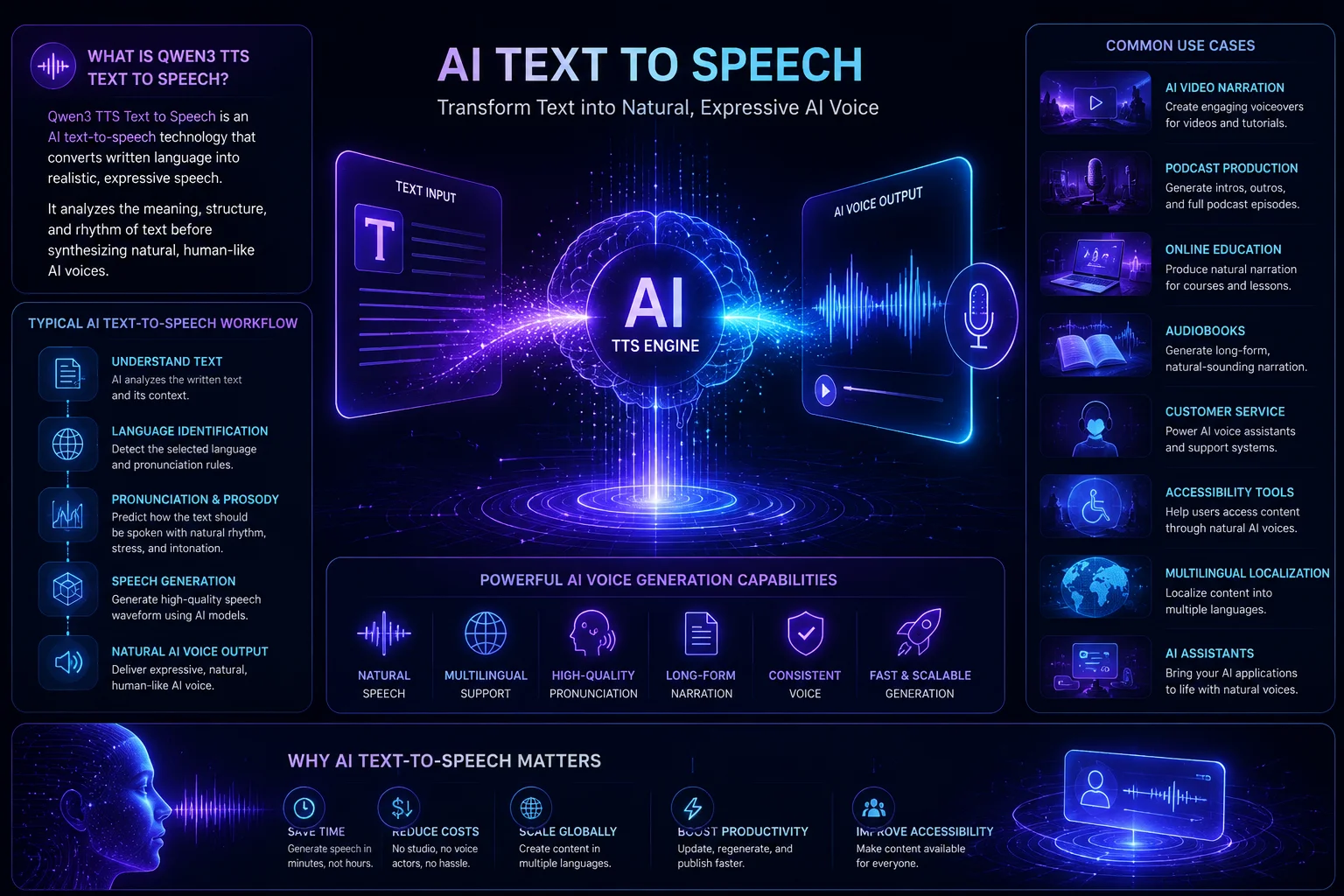
Qwen3 AI Text-to-Speech is an advanced AI speech generation technology that transforms written text into realistic, expressive speech.
Rather than producing simple robotic audio, modern AI speech synthesis models analyze language structure, punctuation, pronunciation, rhythm, and contextual meaning before generating natural human-like voices.
Compared with earlier generations of text-to-speech software, today's AI voice generation models produce smoother pronunciation, more natural pacing, and richer emotional expression. This allows creators, educators, businesses, and developers to generate professional narration suitable for everything from short social media videos to long-form audiobooks.
A typical AI text-to-speech workflow includes several stages:
-
understanding the written text
-
detecting the selected language
-
predicting pronunciation and prosody
-
synthesizing expressive speech
-
generating natural AI voice output
Because speech is generated directly from written content, Qwen3 AI Text-to-Speech is particularly well suited for projects requiring fast, scalable, and consistent voice production without traditional recording sessions.
Typical applications include:
-
AI video narration
-
YouTube voiceovers
-
podcast production
-
online education
-
audiobooks
-
customer service
-
accessibility tools
-
multilingual localization
-
AI assistants
-
enterprise software
For creators who publish content regularly, AI text-to-speech dramatically reduces production time while maintaining consistent voice quality across multiple projects.
Why AI Text-to-Speech Is Becoming Essential
AI voice generation has fundamentally changed the way digital audio content is created.
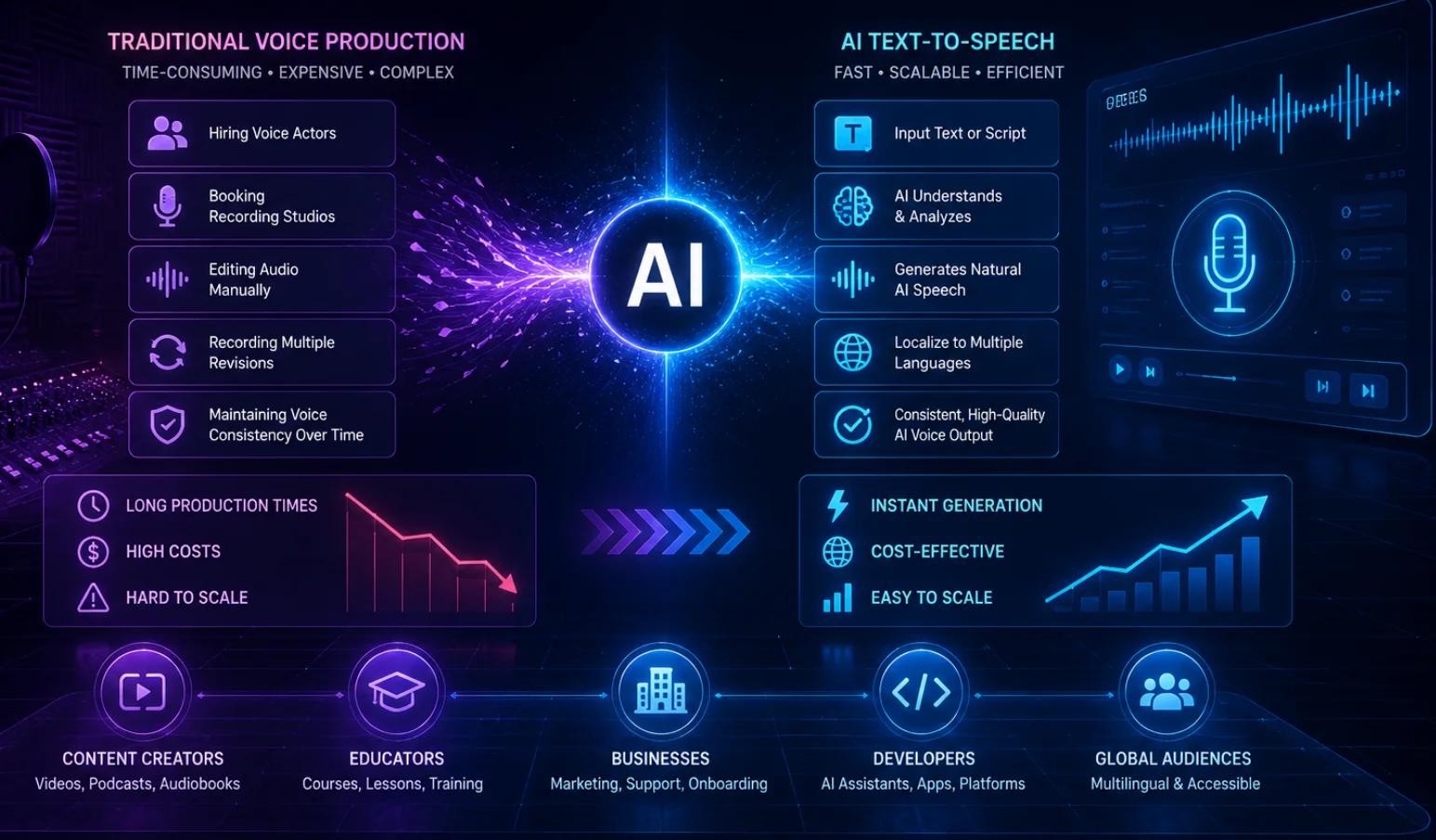
Traditional voice production often involves:
-
hiring voice actors
-
booking recording studios
-
recording multiple takes
-
manually editing audio
-
maintaining consistent vocal quality across revisions
Modern AI text-to-speech replaces much of this process by generating high-quality narration directly from written text.
As a result, creators can revise scripts instantly, localize content into multiple languages, and publish narrated content much faster than traditional production workflows.
For businesses, AI speech generation enables scalable production for:
-
product demonstrations
-
onboarding videos
-
customer support
-
software tutorials
-
marketing campaigns
For educators, it accelerates the creation of narrated lessons, language courses, and multilingual learning materials.
For developers, AI text-to-speech provides the foundation for conversational AI, digital assistants, smart devices, virtual avatars, and interactive applications.
As generative AI continues to improve, Qwen3 AI Text-to-Speech represents a new generation of speech synthesis focused on natural pronunciation, expressive delivery, multilingual capability, and seamless integration into modern AI workflows.
How AI Text-to-Speech Works
Although different AI speech generation models use different neural architectures, nearly all modern AI text-to-speech systems follow a similar workflow.
Instead of simply converting characters into sounds, today's AI models understand language, predict how each sentence should be spoken, and synthesize fluent human-like speech with realistic rhythm and intonation.
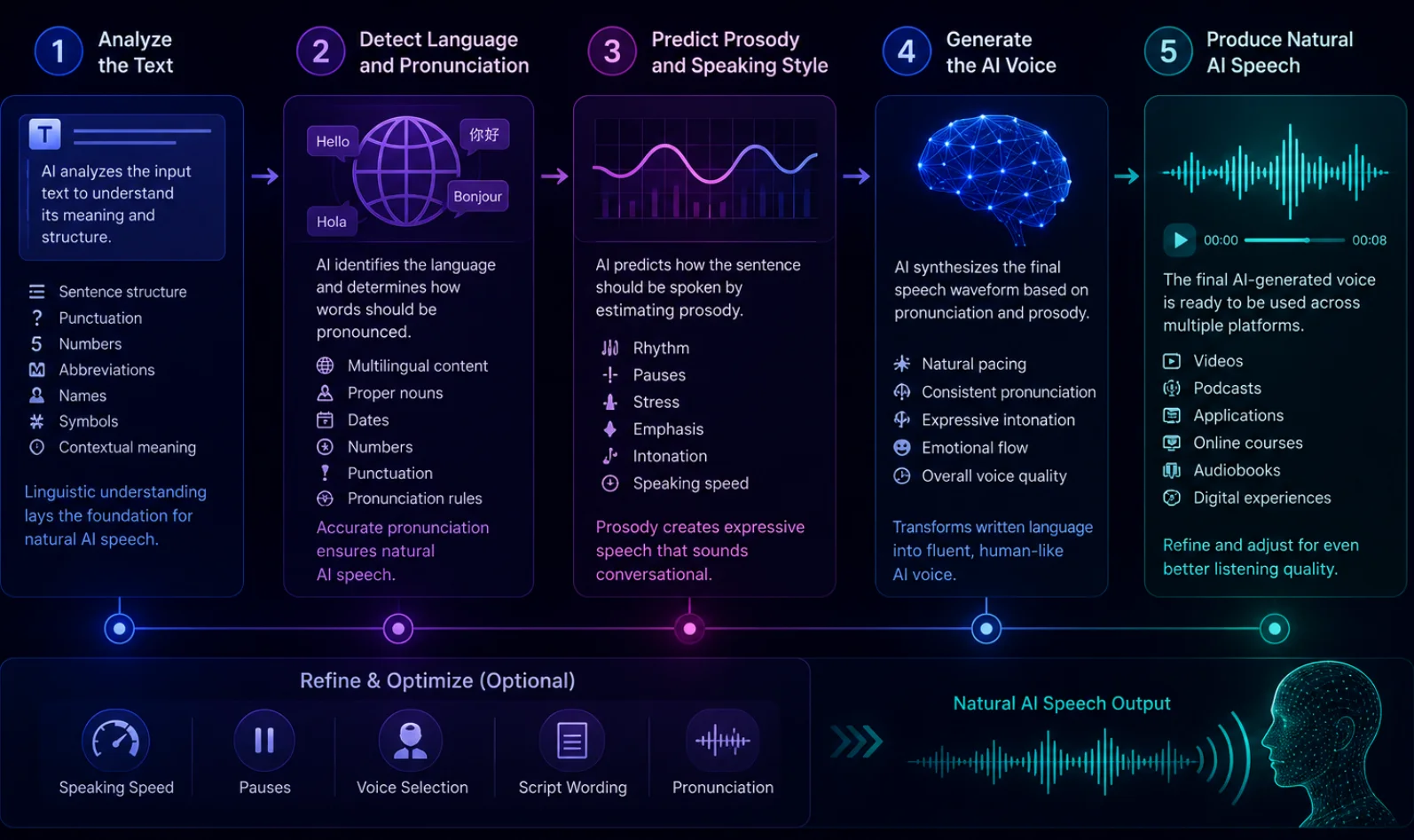
Most AI text-to-speech workflows include five major stages.
Step 1 — Analyze the Text
Everything begins with written content.
Before generating speech, the AI analyzes:
-
sentence structure
-
punctuation
-
numbers
-
abbreviations
-
names
-
symbols
-
contextual meaning
Rather than reading every word literally, the system first determines how the text should be interpreted.
This linguistic understanding forms the foundation for natural AI speech generation.
Step 2 — Detect Language and Pronunciation
After analyzing the text, the AI identifies the selected language and predicts how each word should be pronounced.
This stage helps the model correctly process:
-
multilingual content
-
proper nouns
-
dates
-
numbers
-
abbreviations
-
pronunciation rules
Accurate pronunciation is one of the biggest improvements that modern AI text-to-speech has made over traditional rule-based speech synthesis.
Step 3 — Predict Prosody and Speaking Style
Natural speech depends on much more than pronunciation alone.
The AI predicts how each sentence should be spoken by estimating:
-
rhythm
-
pauses
-
emphasis
-
stress
-
intonation
-
speaking speed
These elements—collectively known as prosody—make AI-generated speech sound natural, conversational, and expressive rather than mechanical.
Step 4 — Generate the AI Voice
Once pronunciation and prosody have been determined, the AI synthesizes the final speech waveform.
The generated narration aims to preserve:
-
natural pacing
-
consistent pronunciation
-
expressive intonation
-
emotional flow
-
stable voice quality
This stage transforms written language into fluent speech suitable for professional content production.
Step 5 — Produce Natural AI Speech
The final output is a complete AI-generated narration ready for use in:
-
YouTube videos
-
podcasts
-
online courses
-
audiobooks
-
business presentations
-
customer support
-
digital assistants
-
accessibility applications
Depending on the project, creators can further improve the result by adjusting:
-
voice selection
-
speaking speed
-
pauses
-
pronunciation
-
script wording
-
style instructions
Even small refinements to these settings can noticeably improve the overall listening experience.
Key Features of Qwen3 AI Text-to-Speech
Modern AI text-to-speech is no longer limited to simply reading text aloud. Today's AI voice generation systems are designed to produce expressive, natural speech for professional content creation, software applications, multilingual communication, and conversational AI.
Below are the core capabilities that make Qwen3 AI Text-to-Speech a powerful solution for modern speech generation workflows.
Generate Natural AI Voices
The primary goal of Qwen3 AI Text-to-Speech is to transform written content into speech that sounds natural instead of robotic.
Rather than converting words directly into audio, the model analyzes sentence structure, punctuation, context, and pronunciation before synthesizing speech.
This produces AI voices with:
-
smoother pronunciation
-
natural rhythm
-
realistic pauses
-
expressive intonation
-
improved listening comfort
Natural speech generation is especially valuable for podcasts, audiobooks, educational content, YouTube narration, and other long-form projects where listeners expect a conversational experience.
Support Multilingual AI Speech Generation
Modern creators increasingly publish content for global audiences.
Qwen3 AI Text-to-Speech supports multilingual AI speech generation, making it easier to create localized voiceovers without recording each language separately.
Common multilingual workflows include:
-
product localization
-
international marketing
-
multilingual tutorials
-
customer support
-
online education
-
software documentation
Using AI-generated speech significantly reduces production time while maintaining consistent voice quality across languages.
Produce High-Quality Long-Form Narration
Earlier text-to-speech systems often struggled with lengthy scripts.
Modern AI speech generation models are much better at maintaining natural rhythm across longer content.
Examples include:
-
YouTube narration
-
audiobooks
-
documentaries
-
online courses
-
product demonstrations
-
corporate training
Stable pacing, accurate pronunciation, and smooth paragraph transitions make long-form listening more engaging.
Create Consistent AI Voice Output
One advantage of AI speech generation is consistency.
Human recordings often vary because of fatigue, recording environments, or microphone placement.
AI-generated voices maintain the same vocal identity throughout a project, making them ideal for:
-
software tutorials
-
learning platforms
-
automated announcements
-
customer support systems
-
recurring content series
This consistency helps establish a recognizable listening experience across multiple pieces of content.
Integrate into Modern AI Workflows
For many creators, speech generation is only one part of a broader AI production pipeline.
A common workflow looks like this:
Script Writing → AI Text-to-Speech → Video Editing → Publishing
Because narration can be regenerated instantly after script changes, creators can iterate much faster than with traditional recording workflows.
For developers, Qwen3 AI Text-to-Speech can also integrate into conversational AI systems, digital assistants, virtual avatars, and enterprise applications.
AI Text-to-Speech vs AI Voice Design vs AI Voice Cloning
Although these three technologies all involve AI-generated speech, they solve different creative problems.
Choosing the right workflow depends on your production goals rather than which technology is "better."
Which One Should You Choose?
Choose AI Text-to-Speech if you want to generate high-quality narration from written content using available AI voices.
Choose AI Voice Design if you want to create an entirely original digital voice for long-term projects or brand identity.
Choose AI Voice Cloning if you need AI to reproduce the voice of a real person from reference audio.
In many production workflows, these technologies work together.
For example:
-
Use AI Voice Design to create a unique narrator.
-
Use AI Text-to-Speech to generate narration with that voice.
-
Use AI Voice Cloning when preserving the identity of an existing speaker is essential.
Understanding these differences helps creators select the right workflow for each project.
How to Use Qwen3 AI Text-to-Speech
Generating natural AI speech with Qwen3 AI Text-to-Speech is straightforward.
The interface follows a simple workflow:
Enter your script → Choose a language → Select a voice → Add style instructions → Generate speech
Below is the complete process based on the current interface.
Step 1 — Select AI Text-to-Speech Mode
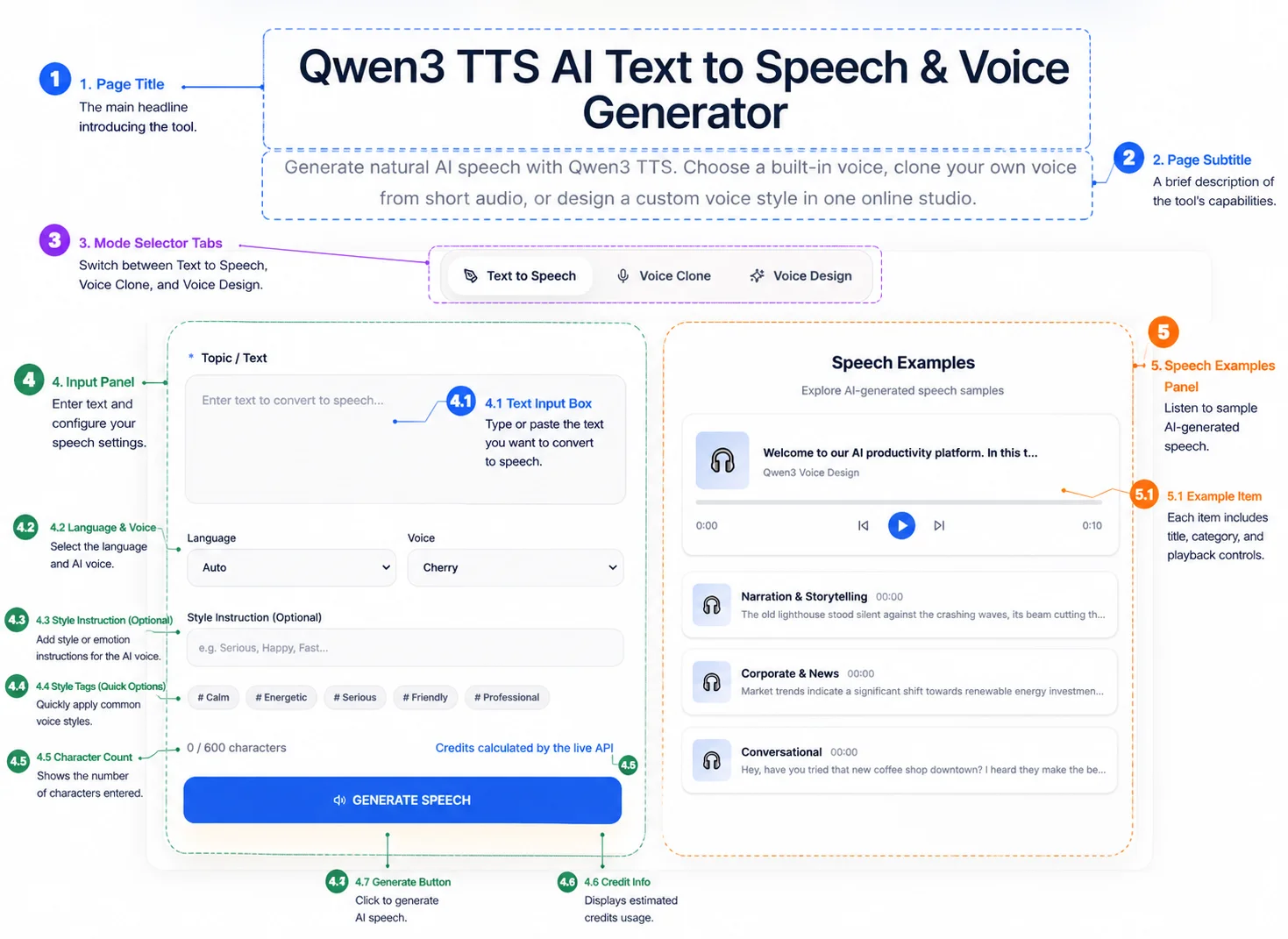
At the top of the interface, choose Text-to-Speech.
Qwen3 provides three generation modes:
-
Text-to-Speech — Convert written text into natural AI speech.
-
Voice Clone — Reproduce an existing speaker from reference audio.
-
Voice Design — Create a completely new AI voice from descriptive prompts.
For this tutorial, make sure Text-to-Speech is selected before continuing.
Tip: Choose Text-to-Speech when you already have a script and simply need high-quality narration.
Step 2 — Enter Your Text
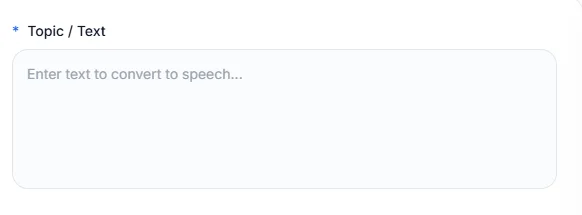
Paste or type your content into the Topic / Text field.
Typical content includes:
-
YouTube narration
-
podcast introductions
-
audiobook chapters
-
online lessons
-
product descriptions
-
marketing copy
-
news reports
For better speech quality:
-
Write complete sentences.
-
Use natural punctuation.
-
Break long paragraphs into smaller sections.
-
Review names and technical terminology before generation.
Remember:
The AI speaks exactly what you write.
A well-written script usually produces noticeably better narration.
Step 3 — Choose the Language
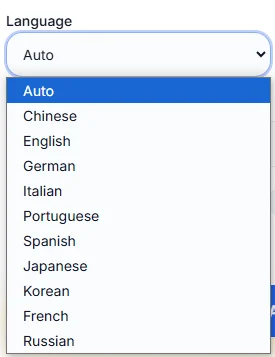
Choose the language from the Language menu.
Although Auto Detect works well in many situations, manually selecting the correct language often improves pronunciation accuracy, especially for multilingual projects.
If your project contains multiple languages, consider generating each language separately for the best overall quality.
Step 4 — Select an AI Voice
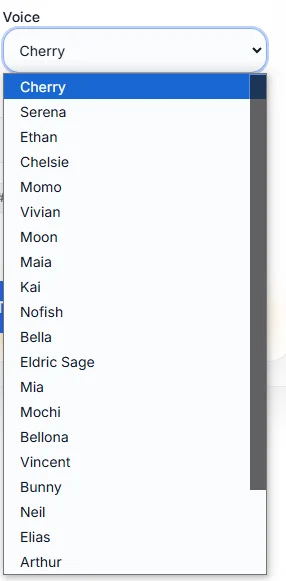
Open the Voice menu and select the narrator that best matches your project.
Different voices are optimized for different scenarios.
Examples include:
-
balanced narration
-
educational delivery
-
marketing presentations
-
professional business speech
-
customer support
-
conversational storytelling
Rather than choosing the most expressive voice, choose the one that best matches your audience and content.
Step 5 — Add a Style Instruction (Optional)

The Style Instruction field controls how the AI delivers the script.
Instead of changing the words themselves, describe the desired speaking style.
Examples include:
-
Speak in a calm and confident tone.
-
Friendly and conversational.
-
Energetic marketing presentation.
-
Slow educational narration.
-
Warm storytelling style.
You can also begin with built-in presets such as:
-
Calm
-
Energetic
-
Friendly
-
Professional
-
Serious
Then refine the style with your own instructions.
Natural language descriptions usually produce more expressive narration than isolated keywords.
Step 6 — Review Character Usage

Before generating speech, review the information displayed beneath the editor.
The interface shows:
-
character count
-
estimated usage or credits
For long-form projects, consider splitting extremely large scripts into smaller sections.
This improves:
-
editing flexibility
-
revision speed
-
pacing consistency
-
resource management
Step 7 — Generate Speech

Click Generate Speech.
Qwen3 processes:
-
your script
-
selected language
-
chosen AI voice
-
optional style instructions
The result is natural AI-generated narration that can be previewed immediately.
Step 8 — Preview the Speech Examples
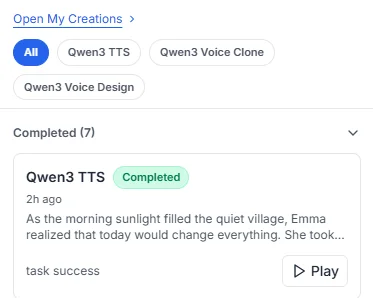
Use the Speech Examples panel to compare different AI voices before exporting your final audio.
Listening to multiple examples helps you evaluate:
-
pronunciation
-
pacing
-
tone
-
emotional delivery
-
overall voice quality
If the narration doesn't fully match your expectations, adjust only one element—such as the voice selection or style instruction—before generating another version.
Small refinements usually produce more consistent improvements than completely changing every setting at once.
Best AI Text-to-Speech Settings
Although Qwen3 AI Text-to-Speech produces high-quality narration with its default configuration, optimizing a few settings can noticeably improve naturalness, clarity, and listener engagement.
The following best practices help generate speech that sounds more expressive and professional.
Choose the Right AI Voice First
Many users focus on the script before selecting a voice, but voice selection often has the greatest impact on the final result.
Different AI voices are optimized for different scenarios.
Selecting a voice that matches your audience usually produces better results than choosing the most expressive option.
Write Natural Style Instructions
The Style Instruction field works best when written in complete natural language.
Instead of writing:
Happy, Fast, Strong
Write:
Speak with a warm, confident tone at a moderate pace while naturally emphasizing important ideas.
Natural descriptions provide much clearer guidance for AI speech generation.
Use Style Presets as a Starting Point
Built-in presets such as:
-
Calm
-
Friendly
-
Professional
-
Serious
-
Energetic
are excellent starting points.
After selecting one, refine it with your own instructions to better match your project.
Combining presets with customized prompts usually produces more natural speech than relying on presets alone.
Format Your Script for Listening
Remember that AI speaks your script—it doesn't rewrite it.
For better narration:
-
Keep sentences concise.
-
Use punctuation naturally.
-
Break long paragraphs into smaller sections.
-
Avoid overly complex sentence structures.
-
Write conversationally rather than academically.
If a sentence feels difficult to read aloud, it will usually sound unnatural when spoken by AI.
Preview Before Exporting
Always listen to the generated speech before exporting.
Pay attention to:
-
pronunciation
-
rhythm
-
pacing
-
emphasis
-
breathing pauses
-
overall listening comfort
Small adjustments to punctuation or style instructions can dramatically improve the final narration.
Monitor Character Usage
For long-form projects such as:
-
audiobooks
-
online courses
-
documentation
-
podcasts
monitor the character counter throughout the writing process.
Splitting long scripts into logical sections makes editing easier and often improves pacing consistency.
Expert Tip
Think of Style Instruction as directing a professional voice actor—not programming software.
Instead of entering isolated adjectives, describe:
-
who is speaking
-
who they are speaking to
-
why they are speaking
-
how they should sound
Context-rich instructions consistently generate more expressive AI narration.
AI Text-to-Speech Prompt Examples
Although Qwen3 AI Text-to-Speech converts written text directly into speech, the quality of the final narration depends heavily on the quality of the script.
Well-structured writing produces smoother pronunciation, better pacing, and more natural delivery.
Below are several practical examples for common production scenarios.
Example 1 — YouTube Video Narration
Script
Welcome back! In today's video, we'll explore how AI text-to-speech technology is transforming digital content creation. We'll compare modern AI voice generators, discuss their strengths, and share practical tips to help you choose the right solution.
Why it works
-
Conversational opening
-
Short sentences
-
Natural transitions
-
Clear pacing
-
Suitable for long-form narration
Example 2 — Educational Course
Script
Artificial intelligence is changing how people learn. In this lesson, we'll explain the basic principles of machine learning before exploring several real-world applications.
Why it works
-
Logical structure
-
Calm rhythm
-
Easy pronunciation
-
Professional educational tone
Example 3 — Marketing Video
Script
Discover a faster way to create professional AI voices. Generate natural speech in minutes, publish content across multiple languages, and scale your production with modern AI technology.
Why it works
-
Energetic tone
-
Short phrases
-
Strong emphasis
-
Suitable for advertisements
Example 4 — Customer Support
Script
Thank you for contacting our support team. Please describe your issue, and we'll guide you through the next steps as quickly as possible.
Why it works
-
Friendly language
-
Clear pronunciation
-
Professional tone
-
Natural customer interaction
Example 5 — Audiobook Narration
Script
As the morning sunlight filled the quiet village, Emma realized that today would change everything. She took a deep breath, opened the old wooden door, and stepped into an entirely new adventure.
Why it works
-
Rich descriptive language
-
Smooth pacing
-
Emotional flow
-
Long-form storytelling
Best Practices for Better AI Speech
Modern AI text-to-speech performs best when the script is written for listening rather than reading.
Following these practices consistently improves narration quality.
Write Like You Speak
People rarely speak using long academic sentences.
Instead, write naturally—as if explaining something directly to another person.
Conversational writing almost always produces more engaging AI narration.
Use Punctuation as Speech Direction
Punctuation acts as breathing instructions for AI.
For example:
-
periods create full stops
-
commas create short pauses
-
question marks influence intonation
-
colons introduce emphasis
Proper punctuation often improves narration more than changing voice settings.
Keep Sentences Short
Long sentences are more difficult for both listeners and AI models.
Whenever possible:
-
express one idea per sentence
-
avoid excessive subordinate clauses
-
simplify complex wording
Shorter sentences improve pacing and listener comprehension.
Review Numbers and Technical Terms
AI pronunciation may vary depending on context.
Before generating narration:
-
write dates clearly
-
expand uncommon abbreviations
-
verify proper nouns
-
simplify difficult terminology when appropriate
Small script improvements often eliminate pronunciation problems.
Read Your Script Aloud
One of the simplest quality checks is reading your script yourself.
If a sentence sounds awkward when spoken naturally, it will likely sound awkward when generated by AI.
Reading aloud helps identify:
-
unnatural phrasing
-
excessive sentence length
-
confusing transitions
-
missing punctuation
before generating speech.
Maintain a Consistent Writing Style
For long-form content such as courses, podcasts, or audiobooks, keep the writing style consistent throughout the project.
Consistent sentence length, tone, and pacing help AI produce smoother narration while providing a better listening experience.
💡 Professional Recommendation
Excellent AI narration starts with excellent writing.
Even the most advanced AI Text-to-Speech model cannot fully compensate for an unclear script.
Investing a few extra minutes in script quality almost always results in noticeably better pronunciation, rhythm, and overall voice quality.
Real-World AI Text-to-Speech Use Cases
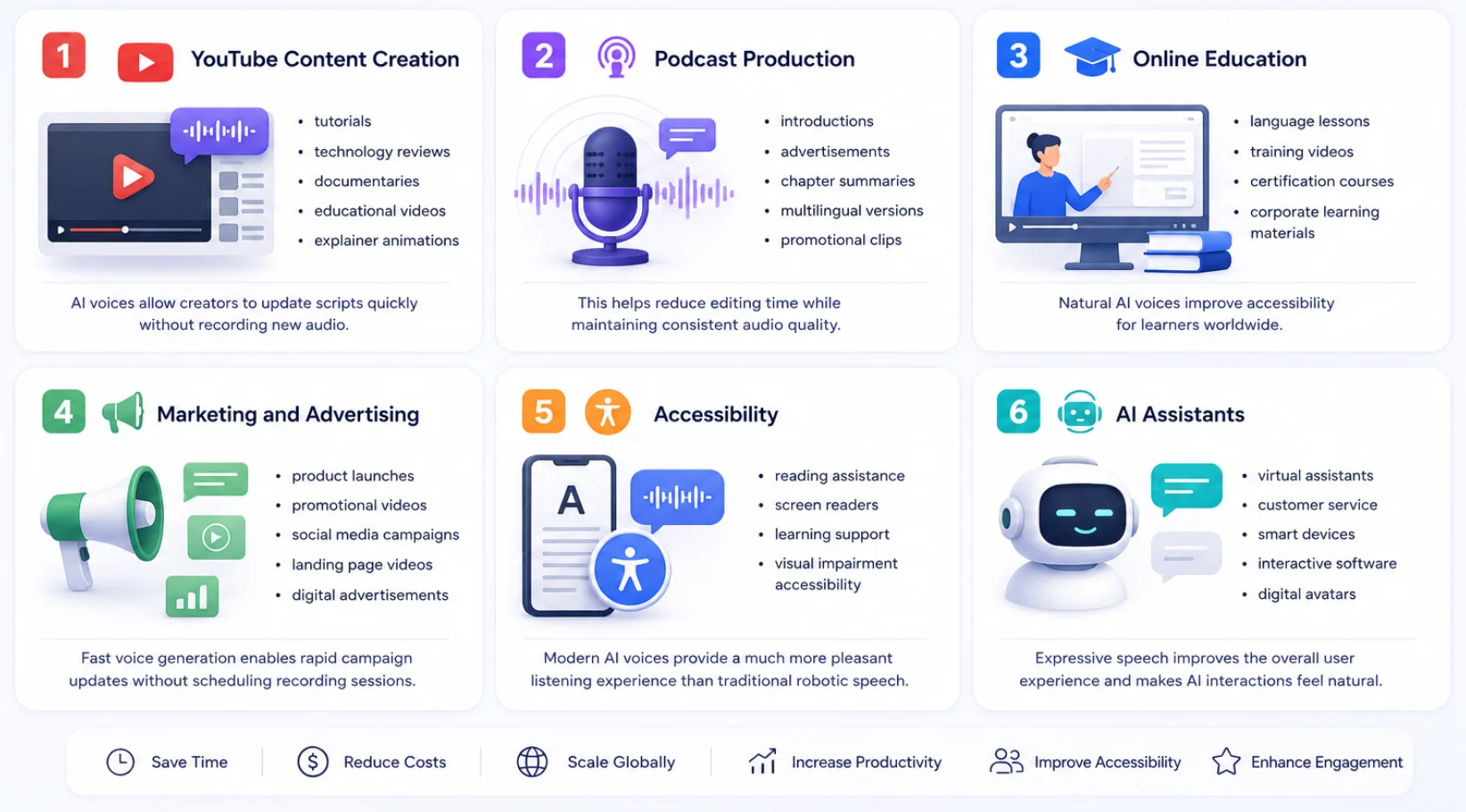
One reason AI Text-to-Speech has become one of the fastest-growing AI technologies is its versatility.
From independent creators to global enterprises, AI-generated speech is now used across almost every digital content workflow.
YouTube Content Creation
Creators use Qwen3 AI Text-to-Speech to produce:
-
tutorials
-
technology reviews
-
documentaries
-
educational videos
-
explainer animations
-
faceless YouTube channels
Instead of recording narration every time a script changes, creators simply update the text and regenerate the audio within minutes.
Podcast Production
Podcasters increasingly rely on AI narration for:
-
episode introductions
-
sponsor advertisements
-
chapter summaries
-
multilingual versions
-
promotional clips
This significantly reduces editing time while maintaining a consistent voice across every episode.
Online Education
Teachers, universities, and learning platforms generate AI speech for:
-
online courses
-
language lessons
-
certification programs
-
corporate training
-
micro-learning content
Natural AI voices improve accessibility while making educational content easier to produce and update.
Marketing and Advertising
Marketing teams use AI-generated narration for:
-
product launches
-
landing page videos
-
promotional campaigns
-
social media advertisements
-
product explainers
Because scripts often change during campaigns, AI narration enables much faster iteration than traditional voice recording.
Accessibility
AI Text-to-Speech plays a vital role in improving digital accessibility.
Typical applications include:
-
screen readers
-
reading assistance
-
learning support
-
accessibility tools for visually impaired users
Compared with older speech synthesis systems, modern AI voices provide a much more natural listening experience.
AI Assistants
Conversational AI increasingly depends on realistic speech generation.
Applications include:
-
virtual assistants
-
customer service bots
-
smart speakers
-
digital avatars
-
enterprise AI assistants
Natural speech improves trust, engagement, and overall user experience.
Software and SaaS Products
Many software companies integrate AI Text-to-Speech into their products for:
-
onboarding walkthroughs
-
interactive tutorials
-
in-app guidance
-
product demonstrations
-
workflow automation
Speech guidance reduces the learning curve while improving product usability.
Common AI Text-to-Speech Mistakes
Even with advanced AI models, poor input can reduce speech quality.
Avoid these common mistakes.
Mistake 1 — Writing Extremely Long Paragraphs
Large blocks of text often produce unnatural pacing.
Instead:
-
split long paragraphs
-
organize ideas into logical sections
-
give the AI natural pause points
This usually results in smoother narration.
Mistake 2 — Ignoring Punctuation
Punctuation acts like breathing instructions.
Without punctuation, AI has fewer clues about:
-
pauses
-
emphasis
-
sentence boundaries
Adding commas and periods often improves speech quality immediately.
Mistake 3 — Writing for Reading Instead of Listening
Many people write as if creating an article rather than narration.
Good AI scripts sound conversational.
If a sentence feels awkward when spoken aloud, it will probably sound awkward when generated by AI.
Mistake 4 — Choosing the Wrong Voice
A children's story and a financial presentation require completely different narration styles.
Before generating speech, ask yourself:
-
Who is the audience?
-
What emotion should the narration create?
-
What is the purpose of this content?
Voice selection should always match the listening scenario.
Mistake 5 — Publishing Without Reviewing
Never assume the first generated version is perfect.
Always listen to the complete narration before publishing.
Pay attention to:
-
pronunciation
-
pacing
-
emphasis
-
unnatural pauses
-
repeated words
A few small edits usually produce a much more polished final result.
Qwen3 AI Text-to-Speech vs ElevenLabs
Both Qwen3 AI Text-to-Speech and ElevenLabs provide advanced AI speech generation, but they are designed with different priorities.
Choose Qwen3 AI Text-to-Speech if you:
-
already use the Qwen AI ecosystem
-
want Text-to-Speech, Voice Design, and Voice Cloning in one platform
-
build AI-powered applications
-
need flexible AI workflows
-
value multilingual AI development
Choose ElevenLabs if you:
-
primarily create professional voiceovers
-
need a mature commercial platform
-
require a large voice marketplace
-
collaborate with production teams
-
focus on content publishing rather than AI development
Quick Comparison
Neither platform is universally better.
If your workflow already revolves around the Qwen ecosystem, Qwen3 AI Text-to-Speech offers tighter integration.
If your primary focus is commercial voiceover production, ElevenLabs remains one of the strongest creator-focused platforms available.
Frequently Asked Questions
What is Qwen3 AI Text-to-Speech?
Qwen3 AI Text-to-Speech is an AI-powered speech generation system that converts written text into natural, expressive speech suitable for videos, education, accessibility, software, podcasts, and business applications.
How is AI Text-to-Speech different from AI Voice Cloning?
AI Text-to-Speech converts written text into speech using available AI voices.
AI Voice Cloning recreates the vocal characteristics of a specific speaker from reference recordings.
Can Qwen3 AI Text-to-Speech generate natural AI voices?
Yes.
Modern AI speech generation models analyze pronunciation, rhythm, sentence structure, and prosody to generate speech that sounds significantly more natural than traditional text-to-speech systems.
Is AI Text-to-Speech suitable for YouTube videos?
Absolutely.
Many creators use AI narration for tutorials, reviews, documentaries, educational videos, and faceless YouTube channels because it enables faster production and easier script updates.
Can AI Text-to-Speech create audiobook narration?
Yes.
With a well-written script, appropriate voice selection, and natural style instructions, AI-generated narration can work well for long-form listening experiences.
Does punctuation improve AI speech quality?
Yes.
Proper punctuation influences pauses, rhythm, emphasis, and overall speech naturalness.
It is one of the simplest ways to improve AI-generated narration.
Does Qwen3 AI Text-to-Speech support multiple languages?
Yes.
Multilingual support allows creators to generate speech for different audiences without recording separate voiceovers.
The exact language availability depends on the current platform implementation.
What is the difference between AI Voice Design and AI Text-to-Speech?
AI Voice Design creates a completely new synthetic voice from descriptive prompts.
AI Text-to-Speech focuses on converting written text into speech using an existing AI voice.
Many creators use both technologies together in the same workflow.
Can businesses use AI-generated narration commercially?
Commercial usage depends on the licensing terms of the platform you are using.
Before publishing AI-generated audio for commercial projects, review the latest usage policies and licensing information provided by the service.
What is the best way to improve AI narration quality?
The biggest improvements usually come from:
-
writing conversational scripts
-
selecting the right AI voice
-
using natural style instructions
-
reviewing punctuation carefully
-
previewing the audio before export
Final Thoughts
Qwen3 AI Text-to-Speech demonstrates how modern speech synthesis has evolved far beyond traditional robotic text readers.
By combining natural pronunciation, expressive prosody, multilingual support, and efficient AI workflows, it enables creators, educators, businesses, and developers to produce high-quality narration at scale.
Whether you're creating YouTube videos, online courses, podcasts, AI assistants, software tutorials, or accessibility solutions, success depends on more than choosing the right model.
Clear writing, thoughtful voice selection, natural style instructions, and careful review all contribute to professional-quality AI narration.
As AI voice technology continues to advance, mastering AI Text-to-Speech workflows will become an increasingly valuable skill for anyone producing digital content.
Try Qwen3 AI Text-to-Speech Today
Ready to create natural AI narration?
Start exploring Qwen3 AI Text-to-Speech to transform written content into expressive speech, experiment with different voices, refine your scripts, and discover how AI speech generation can accelerate your content creation workflow.
Whether you're producing YouTube videos, podcasts, online courses, marketing campaigns, accessibility solutions, or AI-powered applications, Qwen3 AI Text-to-Speech provides a flexible foundation for generating professional-quality speech quickly and efficiently.
Method note
How We Tested
This guide is based on official model documentation and the current qwen3tts.net implementation. It does not represent an independent benchmark unless explicitly stated.
Read the full methodologySources & evidence
Primary sources for this guide
- Qwen3-TTS official model repository
Official model documentation · QwenLM
- Qwen3-TTS CustomVoice model card
Official model page · Qwen
Try the workflow
Create Natural AI Speech with Qwen3 TTS
Test a script, choose a voice, and refine the delivery with an optional instruction.
Open AI Text-to-Speech