Creating a natural AI voice is no longer only about converting
Modern AI voice generation systems allow creators to define voice identity, speaking style, personality, and emotional expression to produce speech designed for specific situations.
This Qwen3 TTS AI Voice Examples guide explores practical examples of AI-generated voices, prompt optimization techniques, and common use cases across content creation, education, business, entertainment, and AI applications.
You will learn:
-
how to create AI voice examples with Qwen3 TTS
-
how different prompts affect AI voice output
-
which voice style fits different scenarios
-
how to evaluate generated speec
-
how creators use AI voice generation in real projects
Whether you are creating YouTube videos, podcasts, online courses, software demos, game characters, or branded voices, these examples provide practical references for building better AI speech experiences.
Quick Answer
What Are Qwen3 TTS AI Voice Examples?
Qwen3 TTS AI Voice Examples are practical demonstrations showing how different prompts, voice settings, and generation workflows create different AI speech outputs.
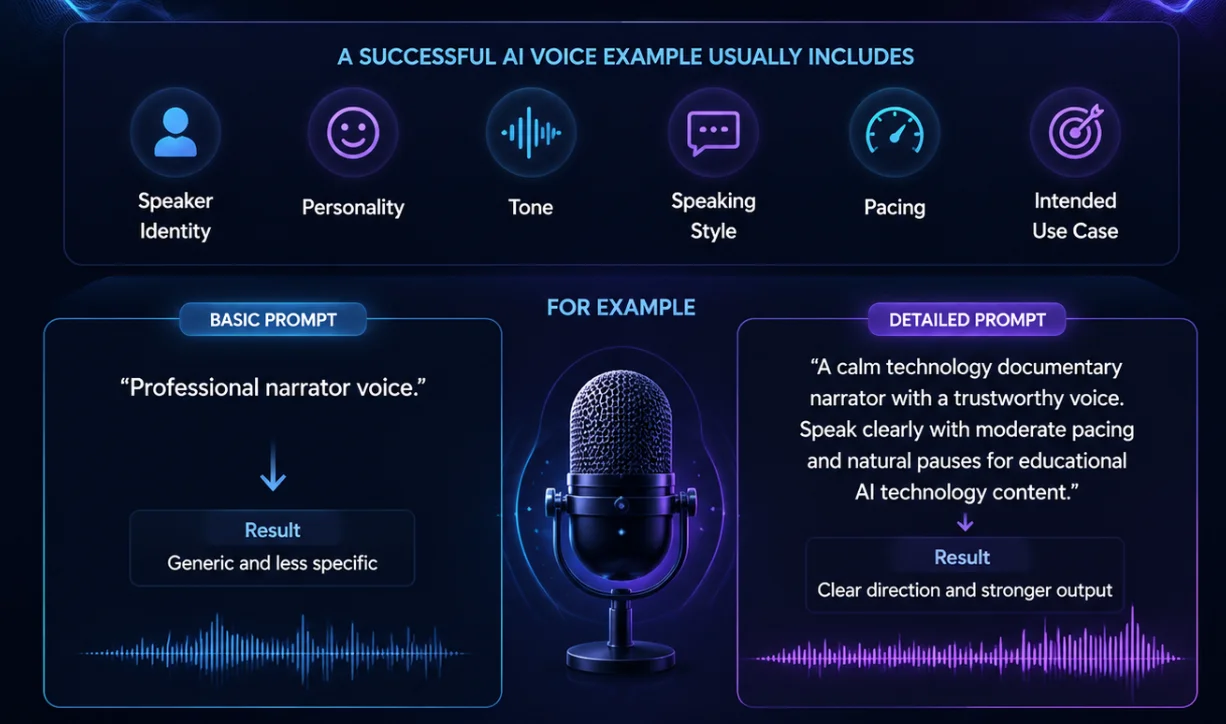
A successful AI voice example usually includes:
-
speaker identity
-
personality
-
tone
-
speaking style
-
pacing
-
intended use case
For example:
A basic prompt:
Professional narrator voice.
usually produces a generic result.
A detailed prompt:
A calm technology documentary narrator with a trustworthy voice. Speak clearly with moderate pacing and natural pauses fo
provides much stronger direction.
The goal of AI voice examples is not only to show what a voice sounds like, but also to demonstrate how creators can design voices for specific communication goals.
How to Create AI Voice Examples with Qwen3 TTS
Creating AI voice examples with Qwen3 TTS follows a simple workflow.
The exact interface may change over time, but the core process usually includes:
Step 1 — Choose the AI Voice Generation Method
Qwen3 TTS workflows can be divided into three main approaches.
AI Text-to-Speech
Best for:
-
YouTube narration
-
tutorials
-
podcasts
-
educational content
-
product explanations
Workflow:
Text Input

↓

AI Voice Generation

↓

Speech Output
The goal is converting written content into natural AI speech.
AI Voice Design
Best for:
-
original voices
-
fictional characters
-
brand identities
-
digital personalities
Workflow:
Voice Description

↓

AI Voice Creation

↓

Generated Speech
Instead of copying an existing speaker, users describe the voice they want to
AI Voice Cloning
Best for:
-
creator voice preservation
-
personal narration
-
consistent voice identity
Workflow:
Reference Voice

↓

Voice Model

↓

New Speech Generation
Voice cloning should only be used with authorized voices.
Step 2 — Prepare the Text
A good AI voice example requires realistic test content.
Avoid testing only:
Hello, welcome.
A better test script includes:
-
longer sentences
-
natural punctuation
-
technical terms
-
different sentence structures
Example:
Artificial intelligence is changing how creators produce digital content. New AI tools are helping people generate videos, images, and voices faster than traditional workflows.
This allows you to evaluate:
-
pronunciation
-
pacing
-
rhythm
-
naturalness
Step 3 — Add Voice Instructions
The quality of an AI voice depends heavily on the description.
A useful AI voice prompt formula:
Speaker Identity

+

Personality

+

Tone

+

Speaking Style

+

Use Case
Example:
A friendly online teacher with a patient and encouraging voice. Speak clearly with moderate pacing for beginner programming courses.
Step 4 — Generate and Review
After generating the AI voice, evaluate:
Naturalness
Does it sound like real human speech?
Pronunciation
Are words and technical terms clear?
Speaking Style
Does the delivery match the purpose?
Consistency
Does the voice remain comfortable during longer content?
Qwen3 TTS Generator Interface Explained
When creating AI voice examples, users usually interact with several key areas.
For your screenshot section, annotate the interface with the following labels.
① Generation Mode Selection
Purpose:
Choose the AI voice workflow.
Examples:
-
Text-to-Speech
-
Voice Design
-
Voice Cloning
② Text Input Area
Purpose:
Enter the script that the AI voice will read.
Best practices:
-
use complete sentences
-
add punctuation
-
test realistic content
③ Voice Selection / Voice Creation Area
Purpose:
Choose the voice identity.
Depending on the workflow:
Text-to-Spe
Select an available voice.
Voice Design:
Describe a new voice.
Voice Cloning:
Use an authorized reference voice.
④ Voice Prompt / Description Field
Purpose:
Control:
-
personality
-
emotion
-
speaking style
-
tone
-
delivery
Example:
A professional technology narrator with a calm and trustworthy voice.
⑤ Audio Generation and Preview
Purpose:
Generate and review the AI speech output.
Check:
-
clarity
-
pacing
-
emotional expression
-
overall quality
AI Voice Examples by Use Case
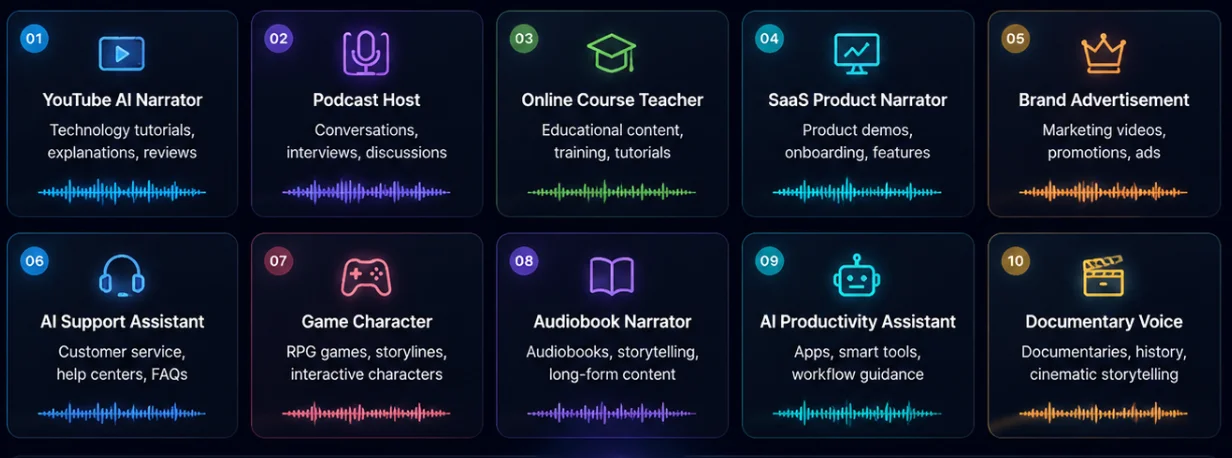
Different projects require different AI voice styles.
A voice that works well for a technology tutorial may not be suitable for a game character or a luxury advertisement.
The following Qwen3 TTS AI Voice Examples include ready-to-test scripts and voice prompts that you can directly use in AI voice generation workflows.
Each example contains:
-
Test Text
-
AI Voice Prompt
-
Best Use Case
-
Expected Voice Style
YouTube AI Technology Narrator
Use Case
Technology creators often need AI voices for:
-
AI tutorials
-
software reviews
-
product explanations
-
educational videos
The ideal voice should sound:
-
knowledgeable
-
trustworthy
-
easy to follow
Test Text
Artificial intelligence is changing the way people create digital content.

From AI image generation to video creation and voice technology, modern AI tools are helping creators produce professional results faster than ever before.

The future of creativity is not about replacing humans. It is about creating better collaboration between people and intelligent systems.
AI Voice Prompt
A professional technology narrator with a calm and trustworthy voice.

Speak clearly with moderate pacing, natural pauses, and an educational storytelling style.

The voice should feel suitable for YouTube AI tutorials and technology review videos.
Expected Voice Style
-
Professional
-
Clear
-
Educational
-
Reliable
Podcast Host Voice
Use Case
Podcast content requires a more conversational AI voice.
The voice should feel like a real host speaking directly with listeners.
Best for:
-
podcast introductions
-
interviews
-
weekly shows
-
discussion content
Test Text
Welcome to today's episode.

In this conversation, we will explore how artificial intelligence is transforming the way people work, learn, and create.

New AI technologies are opening opportunities for creators, businesses, and everyday users around the world.
AI Voice Prompt
A warm and conversational podcast host with a friendly personality.

Speak naturally with relaxed pacing, expressive emotion, and authentic delivery.

The voice should feel engaging and comfortable for long-form podcast conversations.
Expected Voice Style
-
Warm
-
Natural
-
Conversational
-
Engaging
Online Course Teacher Voice
Use Case
Educational content requires clarity and patience.
The voice should help learners understand complex information.
Best for:
-
online courses
-
tutorials
-
training materials
-
educational platforms
Test Text
Machine learning is a branch of artificial intelligence that allows computers to learn from data.

Instead of following only predefined instructions, machine learning systems can identify patterns and improve their performance through experience.

This technology is now widely used in areas such as recommendation systems, image recognition, and natural language processing.
AI Voice Prompt
A patient online instructor with a clear and encouraging voice.

Speak slowly with precise pronunciation, natural pauses, and a supportive teaching style.

The voice should be suitable for beginner educational courses.
Expected Voice Style
-
Patient
-
Clear
-
Supportive
-
Professional
SaaS Product Demo Narrator
Use Case
Software companies often need AI voices for:
-
product demos
-
landing page videos
-
onboarding tutorials
-
feature explanations
The voice should build trust while explaining technical information.
Test Text
Our AI platform helps teams automate repetitive workflows and improve productivity.

With intelligent automation tools, users can streamline daily tasks, reduce manual work, and focus on more important business decisions.

Start building faster and smarter workflows with modern artificial intelligence.
AI Voice Prompt
A confident SaaS product narrator with a professional and trustworthy voice.

Speak clearly with structured pacing and a modern business presentation style.

The voice should feel suitable for software demonstrations and enterprise audiences.
Expected Voice Style
-
Professional
-
Confident
-
Modern
-
Trustworthy
Brand Advertisement Voice
Use Case
Brands need voices that create emotional connection.
Best for:
-
product launches
-
marketing videos
-
advertisements
-
promotional campaigns
Test Text
Technology is evolving faster than ever.

Discover a new generation of intelligent tools designed to help people create, communicate, and achieve more.

Experience the future of digital innovation today.
AI Voice Prompt
A premium brand narrator with an elegant and confident voice.

Deliver speech with emotional impact, refined pacing, and a sophisticated commercial style.

The voice should feel suitable for high-end technology advertisements.
Expected Voice Style
-
Premium
-
Emotional
-
Elegant
-
Persuasive
AI Customer Support Assistant
Use Case
Customer support voices need to feel:
-
helpful
-
patient
-
reliable
Best for:
-
AI assistants
-
customer service systems
-
help centers
Test Text
Hello, thank you for contacting our support team.

I can help you find information, solve common problems, and guide you through the next steps.

Please let me know what you would like assistance with today.
AI Voice Prompt
A friendly customer support assistant with a calm and reassuring voice.

Speak clearly with polite expression, moderate speed, and a helpful conversational tone.

The voice should make users feel comfortable and supported.
Expected Voice Style
-
Friendly
-
Calm
-
Helpful
-
Reliable
Fantasy Game Character Voice
Use Case
Game developers need AI voices with strong personality.
Best for:
-
RPG characters
-
interactive stories
-
game dialogue
Test Text
The ancient kingdom has waited for this moment for generations.

Beyond the forgotten mountains lies a secret that could change the future of our world.

The journey ahead will not be easy, but we must continue forward.
AI Voice Prompt
A heroic fantasy warrior with a powerful and cinematic voice.

Speak with emotional intensity, confidence, and dramatic storytelling.

The voice should feel suitable for a role-playing game character.
Expected Voice Style
-
Powerful
-
Dramatic
-
Memorable
-
Cinematic
Audiobook Narrator Voice
Use Case
Long-form narration requires stability.
Best for:
-
audiobooks
-
storytelling
-
documentary content
Test Text
The world has always been shaped by curiosity and discovery.

Every generation creates new tools that change how people understand themselves and the universe around them.

Technology is not only about machines. It is about human imagination and creativity.
AI Voice Prompt
A professional audiobook narrator with a calm and expressive voice.

Speak with natural rhythm, emotional variation, and consistent pacing.

The voice should remain comfortable for long listening sessions.
Expected Voice Style
-
Stable
-
Expressive
-
Natural
-
Immersive
AI Productivity Assistant
Use Case
Digital assistants require natural conversational voices.
Best for:
-
productivity apps
-
smart tools
-
AI workflows
Test Text
Good morning.

You have three important tasks scheduled for today.

I can help you organize your priorities, manage your workflow, and complete your daily goals more efficiently.
AI Voice Prompt
A modern AI assistant with a friendly and intelligent personality.

Speak naturally with a clear conversational tone and efficient delivery.

The voice should feel helpful and easy to interact with.
Expected Voice Style
-
Intelligent
-
Friendly
-
Natural
-
Efficient
Documentary Storyteller Voice
Use Case
Documentary content requires emotional storytelling.
Best for:
-
history videos
-
science documentaries
-
cinematic narration
Test Text
Throughout history, innovation has changed the way humans understand the world.

From early discoveries to modern artificial intelligence, every technological breakthrough has created new possibilities for society.

The next chapter of innovation is only beginning.
AI Voice Prompt
A cinematic documentary narrator with a deep and thoughtful voice.

Speak with controlled emotion, natural pauses, and immersive storytelling.

The voice should feel suitable for professional documentary production.
Expected Voice Style
-
Cinematic
-
Deep
-
Thoughtful
-
Emotional
Qwen3 TTS Prompt Comparison Example
to understand how AI voice prompts influence the final output, this section demonstrates a practical Qwen3 TTS AI Voice Generation
The goal is to create a professional AI narrator voice for technology-related content.
This example
Prompt Quality → Voice Style → Final AI Speech Output
Test Goal
Objective
Create an AI voice suitable for:
-
YouTube technology videos
-
AI tutorials
-
software explanations
-
educational content
Target Voice Characteristics
The desired AI voice should be:
-
professional
-
trustworthy
-
easy to understand
-
suitable for long-form listening
-
natural rather than overly dramatic
Test Script
The same script is used in this illustrative comparison to show how prompt wording can affect the result.
Script:
Artificial intelligence is transforming how people create digital content. From AI video generation to voice technology, new tools are helping creators produce high-quality experiences faster and more efficiently.
This script was selected because it includes:
-
technical terminology
-
longer sentences
-
multiple ideas
-
natural narration requirements
It allows evaluation of:
-
pronunciation accuracy
-
speaking rhythm
-
emotional delivery
-
overall naturalness
Example Version 1 — Basic AI Voice Prompt
Prompt:
Professional narrator voice.
Generation Result Analysis
The output is understandable, but the voice direction is too broad.
The AI understands that the voice should be professional, but it does not know:
-
what type of narrator
-
what audience it serves
-
what emotional style is required
-
how the deliver
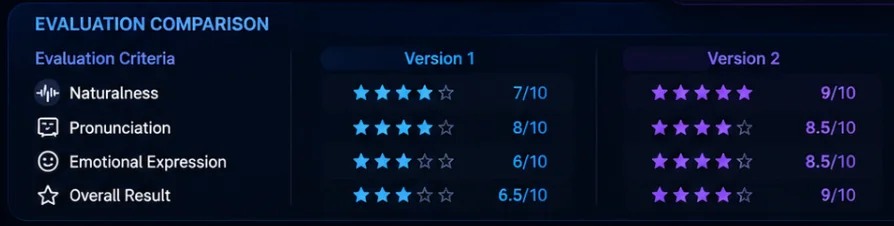
Evaluation
Naturalness
The speech sounds clear but slightly generic.
Score:
7/10
Pronunciation
Technical words are mostly understandable.
Score:
8/10
Emotional Expression
The delivery lacks storytelling depth.
Score:
6/10
Overall Result
The voice is usable for basic narration, but it does not create a strong identity.
Example Version 2 — Optimized AI Voice Prompt
Instead of changing the model or settings, the prompt is improved.
Prompt:
A calm and trustworthy technology documentary narrator with a professional voice. Speak clearly with moderate pacing, natural pauses, and an educational storytelling style. The voice should feel suitable for explaining artificial intelligence topics to a general audience.
Generation Result Analysis
The improved prompt provides more c
-
speaker role
-
personality
-
speaking style
-
audience
-
content purpose
Evaluation
Naturalness
The voice feels more conversational and balanced.
Score:
9/10
Pronunciation
Technical concepts are delivered more clearly.
Score:
8.5/10
Emotional Expression
The narration has stronger storytelling quality.
Score:
8.5/10
Overall Result
The optimized prompt creates a more suitable AI voice for educational technology content.
Prompt Optimization Analysis
The difference between the two generations comes from better voice direction.
Key Lesson From the Test
A common misunderstanding is that AI voice quality depends only on the model.
In practice, the prompt has
A simple instruction:
Professional voice.
creates a general output.
A detailed instruction:
A calm technology educator explaining complex AI concepts to beginners.
creates a much stronger communication direction.
AI Voice Quality Evaluation Framework
When testing Qwen3 TTS AI Voice Examples, evaluate the output using five criteria.
Naturalness
Question:
Does the AI voice sound like natural human speech?
Check:
-
sentence rhythm
-
pauses
-
transitions
-
conversational flow
A natural AI voice should avoid:
-
robotic timing
-
unnatural pauses
-
repetitive patterns
Pronunciation Quality
Question:
Are words and technical terms pronounced correctly?
Important for:
-
AI terminology
-
company names
-
product names
-
numbers
A strong AI voice generator should maintain clear pronunciation across different scripts.
Emotional Expression
Question:
Does the voice match the intended feeling?
Examples:
Educational:
-
calm
-
patient
-
supportive
Marketing:
-
energetic
-
confident
-
persuasive
Storytelling:
-
expressive
-
immersive
-
emotional
Voice Consistency
Question:
Does th
Important for:
-
podcasts
-
audiobooks
-
courses
-
documentaries
A good AI voice should maintain:
-
tone
-
pacing
-
personality
throughout the entire project.
Audience Fit
Question:
Is the voice appropriate for the listener?
Examples:
Beginner Education
Recommended:
-
friendly
-
clear
-
patient
Enterprise Communication
Recommended:
-
professional
-
confident
-
reliable
Entertainment
Recommended:
-
expressive
-
memorable
-
creative
AI Voice Examples Comparison Table
Different projects require different AI voice styles.
How to Select the Right AI Voice Workflow
The correct workflow depends on your goal.
Need Fast Narration?
Choose:
AI Text-to-Speech
Best for:
-
videos
-
articles
-
tutorials
-
podcasts
Need a Complete
Choose:
AI Voice Design
Best for:
-
fictional characters
-
brand voices
-
virtual personalities
Need to Preserve an Existing Voice?
Choose:
AI Voice Cloning
Best for:
-
creators
-
educators
-
personal brands
Common AI Voice Generation Mistakes
Even with advanced AI speech models, poor workflow decisions can reduce output quality.
Mistake 1 —Writing Extremely Short Prompts
Example:
Good voice.
Problem:
The AI receives almost no creative direction.
Better:
A friendly technology educator with a clear and trustworthy voice. Speak naturally for beginner AI tutorials.
Mistake 2 — Choosing a Voice Without Considering the Audience
A voice should match the listener.
Example:
A serious documentary voice may not work well for:
-
children's education
-
customer support
-
casual podcasts
Always consider:
-
audience expectation
-
content purpose
-
listening environment
Mistake 3 — Testing Only Short Sentences
Short samples
A voice may sound good for five seconds but become uncomfortable during longer content.
Test with:
-
paragraphs
-
realistic scripts
-
complete sections
Mistake 4 — Overloading Prompts With Contradictory Instructions
Avoid:
Calm, energetic, serious, funny, dramatic, relaxed voice.
The AI cannot determine the priority.
Better:
Friendly and energetic educational presenter with a professional tone.
Mistake 5 — Ignoring Script Quality
AI voice quality depends partly on the input text.
Improve:
-
punctuation
-
sentence structure
-
readability
A well-written script usually produces better AI speech.
Mistake 6 — Using One Voice for Everything
Different content requires different voices.
A brand advertisemen
Frequently Asked Questions
What Are Qwen3 TTS AI Voice Examples?
Qwen3 TTS AI Voice Examples are practical demonstrations showing how different prompts, voice styles, and generation workflows create different AI speech outputs.
They help users understand how AI voice generation can be customized for different scenarios, including:
-
content creation
-
education
-
business communication
-
gaming
-
AI assistants
-
digital products
A useful AI voice example does not only show the final sound. It also explains:
-
the prompt used
-
the intended purpose
-
the expected voice characteristics
-
the recommended workflow
How Do I Create AI Voice Examples With Qwen3 TTS?
Creating AI voice examples with Qwen3 TTS usually follows a simple process:
-
Choose the appropriate generation method.
-
Prepare a realistic test script.
-
Select or design the voice style.
-
Add detailed voice instructions.
-
Generate the speech output.
-
Evaluate and refine the result.
The quality of the final AI voice depends on both the technology and the clarity of the instructions.
Which Qwen3 TTS Workflow Should I Use?
The best workflow depends on your goal.
Use AI Text-to-Speech for:
-
YouTube narration
-
tutorials
-
podcasts
-
educational videos
-
product explanations
AI Text-to-Speech is ideal when you already have the content
Use AI Voice Design for:
-
original characters
-
brand voices
-
fictional personalities
-
creative projects
AI Voice Design is suitable when you want to create a new voice identity instead of using an existing one.
Use AI Voice Cloning for:
-
creator voice preservation
-
personal narration
-
consistent voice identity
AI Voice Cloning helps maintain a recognizable voice style when producing new content.
What Makes a Good AI Voice Example?
A strong AI voice example usually includes five elements:
Clear Purpose
Define what the voice is for.
Examples:
-
educational video
-
advertisement
-
game character
-
customer support
Specific Voice Identity
Describe who is speaking.
Examples:
-
technology narrator
-
online teacher
-
podcast host
-
AI assistant
Detailed Voice Characteristics
Include:
-
tone
-
personality
-
emotion
-
pacing
-
speaking style
Realistic Test Content
Use scripts that represent actual usage.
Avoid testing only short phrases.
Quality Evaluation
Review:
-
naturalness
-
pronunciation
-
consistency
-
audience fit
How Can I Make AI Voices Sound More Natural?
to create more natural AI speech:
-
write better prompts
-
use realistic scripts
-
add punctuation
-
define speaking style
-
choose the right workflow
For example:
Instead of:
Professional voice.
Use:
A calm and trustworthy business narrator with clear pronunciation and moderate pacing for software demonstrations.
The second prompt gives the AI more communication context.
Can Qwen3 TTS AI Voice Examples Be Used for Commercial Projects?
Yes.
AI voice generation can support many commercial applications, including:
-
marketing videos
-
software tutorials
-
online courses
-
customer support systems
-
digital assistants
-
branded content
However, when using AI Voice Cloning, creators should only use voices with proper authorization.
Responsible voice usage is important for maintaining trust and protecting voice identity.
Are AI Voice Examples the Same as AI Voice Prompts?
No.
They are related but different.
AI Voice Prompt Examples focus on the instructions used to create a voice.
Example:
A friendly online teacher with a calm and encouraging voice.
AI Voice Examples include the complete workflow:
-
prompt
-
voice direction
-
use case
-
generated result
-
evaluation
Prompts are the input. Examples show the complete process.
Final Thoughts
Qwen3 TTS AI Voice Examples provide a practical way to understand modern AI speech generation.
The biggest lesson is that high-quality AI voices are not created by selecting a model alone.
The best results come from combining:
-
the right generation workflow
-
clear voice objectives
-
detailed AI voice prompts
-
realistic test scripts
-
continuous optimization
Different projects require different voice strategies.
A YouTube creator may need an engaging narrator that keeps viewers interested.
An educator may need a patient voice that improves learning.
A business may need a consistent brand voice across multiple platforms.
A game developer may need a unique character personality that feels memorable.
The role of AI voice generation is not simply replacing traditional recording.
It provides creators and businesses with new ways to design scalable, consistent, and flexible voice experiences.
By understanding how prompts influence AI speech, users can create voices that better match their audience, content goals, and brand identity.
Create Better AI Voices With Qwen3 TTS
Explore different Qwen3 TTS AI Voice Examples and experiment with:
-
AI Text-to-Speech workflows
-
AI Voice Design prompts
-
AI Voice Cloning scenarios
-
custom voice styles
-
professional narration
Whether you are creating videos, podcasts, courses, games, applications, or digital products, a carefully designed AI voice can improve how audiences experience your content.
Start with an example, refine your prompt, and build an AI voice workflow that matches your creative goals.
Method note
How We Tested
This guide is based on official model documentation and the current qwen3tts.net implementation. It does not represent an independent benchmark unless explicitly stated.
Read the full methodologySources & evidence
Primary sources for these examples
- Qwen3-TTS official model repository
Official model documentation · QwenLM
- Qwen3-TTS CustomVoice model card
Official model page · Qwen
Try the workflow
Create Your Own AI Voice Examples
Use Qwen3 TTS to test a script, compare voices, and refine delivery instructions for your next project.
Open AI Text-to-Speech