What Is Qwen3 TTS Voice Cloning?
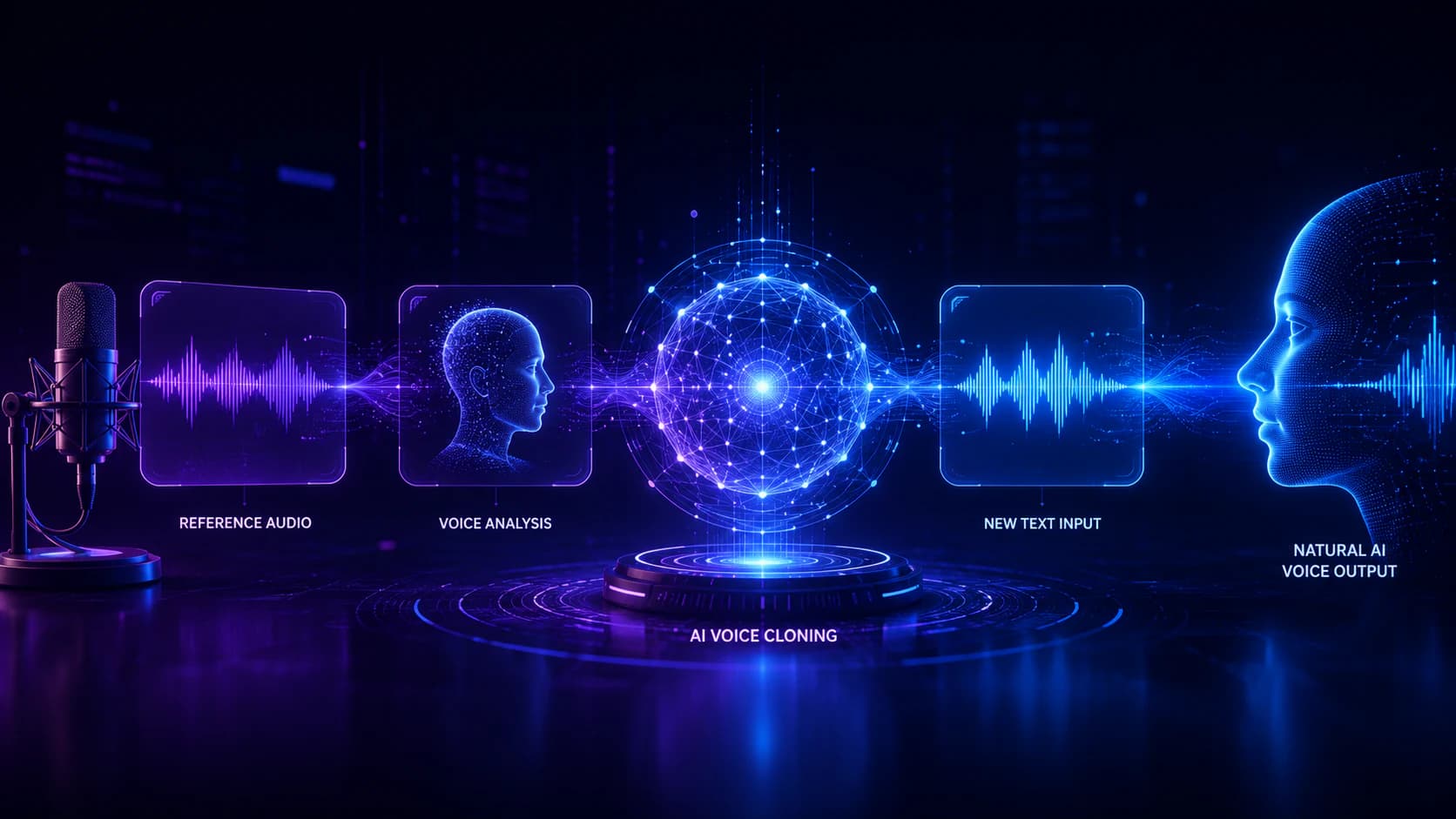
In the Qwen3 TTS workspace, AI Voice Cloning is an AI speech generation workflow that recreates the unique vocal characteristics of a speaker from a reference recording and generates completely new AI voices from text. Rather than copying or editing existing audio, the system analyzes vocal patterns—including pronunciation, rhythm, pitch, pacing, and speaking style—to produce new speech that resembles the original speaker.
Unlike conventional recording workflows, AI voice cloning allows creators to generate additional narration without returning to the microphone whenever a script changes. This makes it particularly valuable for projects that require frequent updates, multilingual content, or long-term voice consistency.
The reference recording serves as a voice guide instead of reusable audio material. During AI voice generation, the model extracts vocal characteristics from the recording, builds an internal voice representation, and combines it with new text to synthesize fresh speech. Because the generated output is newly created rather than copied, the workflow is fundamentally different from audio editing or simple voice replacement.
As AI voice generation technology continues to improve, voice cloning is becoming an increasingly practical solution for creators, developers, educators, and businesses that need scalable speech production while maintaining a recognizable voice identity.
Voice Cloning vs. Traditional Text-to-Speech
Although both AI voice cloning and traditional text-to-speech convert written text into spoken audio, they are designed for different production workflows.
Traditional text-to-speech typically relies on a library of predefined synthetic voices. Users select one of the available voices, enter their script, and receive generated speech. These voices are optimized for general-purpose narration but are not intended to reproduce the characteristics of a specific speaker.
AI voice cloning, by contrast, begins with a reference recording. Instead of selecting a generic voice, the system analyzes vocal identity and generates entirely new speech that reflects many of the speaker's unique characteristics. The objective is not simply to produce spoken audio, but to create natural AI voices that remain consistent across different scripts and projects.
For creators who regularly update videos, podcasts, online courses, or software products, AI voice generation can significantly reduce repetitive recording while helping maintain a familiar listening experience.
Common AI Voice Cloning Applications
As AI voice generation becomes more accessible, AI voice cloning is being adopted across a wide range of industries. Instead of repeatedly recording similar content, creators can reuse a consistent voice across multiple projects.
Common applications include:
-
AI voice narration for YouTube videos
-
AI voice generation for podcasts
-
Audiobook production
-
Online education and e-learning
-
AI customer support assistants
-
Virtual assistants
-
Game dialogue and NPC voices
-
Accessibility and assistive technologies
-
Product demonstrations
-
Corporate training
-
Software interfaces
Whether you are creating educational content, building AI-powered applications, or producing marketing videos, Qwen3 TTS AI Voice Cloning can help streamline voice production while maintaining consistent AI voices throughout your workflow.
How Qwen3 TTS AI Voice Cloning Works
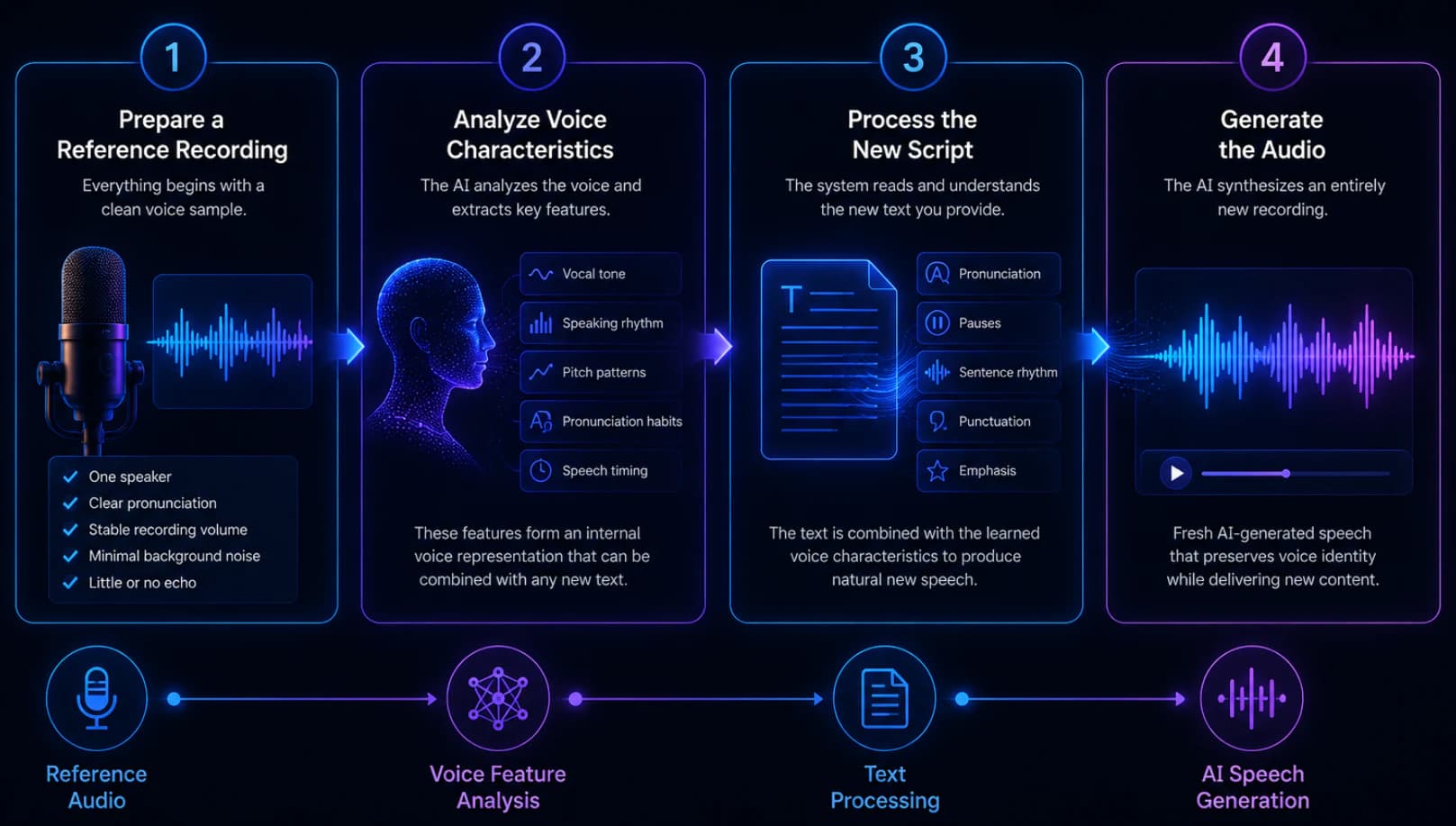
Although the exact implementation depends on the platform, most AI voice cloning systems follow a similar workflow. Understanding each stage helps explain why reference audio quality often has a greater impact on results than many users expect.
Step 1 — Prepare a High-Quality Reference Recording
Every AI voice generation workflow begins with a clean reference recording.
A high-quality sample should include:
-
One clearly identifiable speaker
-
Natural pronunciation
-
Stable recording volume
-
Minimal background noise
-
Little or no echo
The system analyzes this recording to understand the speaker's vocal identity before generating new AI voices.
Step 2 — Analyze AI Voice Characteristics
Rather than memorizing individual words or sentences, the AI voice cloning model extracts vocal characteristics such as:
-
Speaking rhythm
-
Pitch variation
-
Vocal tone
-
Pronunciation habits
-
Speech timing
These characteristics become an internal voice representation that can later be combined with completely new scripts.
Because the model learns vocal features instead of recording content, it can generate speech for text that never appeared in the original recording.
Step 3 — Process the New Script
After building the voice representation, the AI speech generation system analyzes your new script.
It determines:
-
Pronunciation
-
Sentence rhythm
-
Pauses
-
Punctuation
-
Word emphasis
The processed script is then combined with the learned voice representation to create natural AI voices that match the intended speaker as closely as possible.
Step 4 — Generate the Audio
The final stage synthesizes an entirely new recording.
Rather than replaying the reference audio, the AI voice generates fresh speech that aims to preserve the overall voice identity while delivering new content.
For longer projects, many experienced creators generate shorter sections first, review pronunciation and pacing, and then continue with the remaining script. This iterative workflow generally produces more consistent AI voice generation results than generating an entire project in a single request.
What Affects AI Voice Cloning Quality?
The quality of AI voice generation depends on multiple factors working together rather than a single setting.
The most important factors include:
-
High-quality reference recordings
-
Natural pronunciation
-
Stable speaking pace
-
Minimal background noise
-
Good microphone placement
-
Well-structured scripts
-
Appropriate punctuation
-
Careful review before publishing
Among these, the reference recording usually has the greatest influence on AI voice cloning quality. Even advanced AI voice generators cannot fully compensate for poor-quality input audio. By combining clean recordings with natural scripts and an iterative review process, creators can consistently produce more realistic AI voices and improve the overall quality of AI speech generation.
Key Features of Qwen3 TTS AI Voice Cloning
Qwen3 TTS AI Voice Cloning is more than simply reproducing a speaker's voice. A modern AI voice generator should help creators produce natural AI voices efficiently while supporting real-world production workflows. Whether you are creating educational content, marketing videos, podcasts, or AI-powered applications, the ability to generate consistent speech from a reference recording can significantly reduce manual recording work.
Below are the key advantages of using AI voice cloning as part of an AI voice generation workflow.
Create New Speech While Preserving Voice Identity
One of the biggest advantages of Qwen3 TTS AI Voice Cloning is the ability to create completely new speech while maintaining the vocal characteristics of a reference speaker.
Instead of recording every new sentence manually, creators can generate additional narration that preserves a recognizable voice across multiple projects.
This approach is particularly useful for:
-
YouTube creators
-
Podcast hosts
-
Online educators
-
Audiobook producers
-
Corporate trainers
-
Product demonstration videos
Maintaining a consistent AI voice helps improve audience recognition while reducing repetitive recording work.
Accelerate AI Voice Generation for Content Updates
Content rarely stays unchanged. Product information, software features, pricing, statistics, and educational materials often require revisions after publication.
With AI voice generation, creators can update narration by generating new speech from revised text instead of recording the entire project again.
Typical update scenarios include:
-
correcting factual errors
-
updating product names
-
revising pricing
-
adding new sections
-
replacing outdated information
For teams that publish content regularly, AI voice cloning can make ongoing maintenance much more efficient.
Improve Production Efficiency with an AI Voice Generator
Traditional narration often involves writing, recording, editing, noise reduction, and exporting before publication.
A modern AI voice generator streamlines much of this workflow by converting approved scripts into natural AI voices while reducing repetitive recording sessions.
A typical production pipeline becomes:
Write Script → Generate AI Voice → Review → Edit → Publish
Although human review remains essential, AI speech generation can significantly reduce production time for many speech-based projects.
Support Multiple AI Voice Generation Scenarios
One of the strengths of AI voice cloning is its flexibility across different production environments.
Common scenarios include:
-
educational videos
-
AI customer support
-
marketing presentations
-
software tutorials
-
digital assistants
-
interactive applications
-
game dialogue
-
product demonstrations
Using the same reference recording helps maintain consistent AI voices throughout each workflow.
Integrate AI Voice Cloning into Larger AI Workflows
For developers and technical teams, Qwen3 TTS AI Voice Cloning can become one component of a broader AI production pipeline.
For example:
AI Writing → Script Review → AI Voice Generation → Video Editing → Publishing
Combining language models with AI speech generation allows creators to automate more of their content production while maintaining a consistent voice identity.
How to Use Qwen3 TTS AI Voice Cloning
The Qwen3 TTS AI Voice Cloning workspace combines reference audio, script input, language selection, and optional reference text into a single interface. Instead of adjusting complicated audio parameters, users prepare a high-quality reference recording, enter their script, and allow the AI voice generator to create new speech based on the supplied voice characteristics.
The following tutorial explains a typical AI voice generation workflow.
Step 1 — Open the AI Voice Cloning Workspace
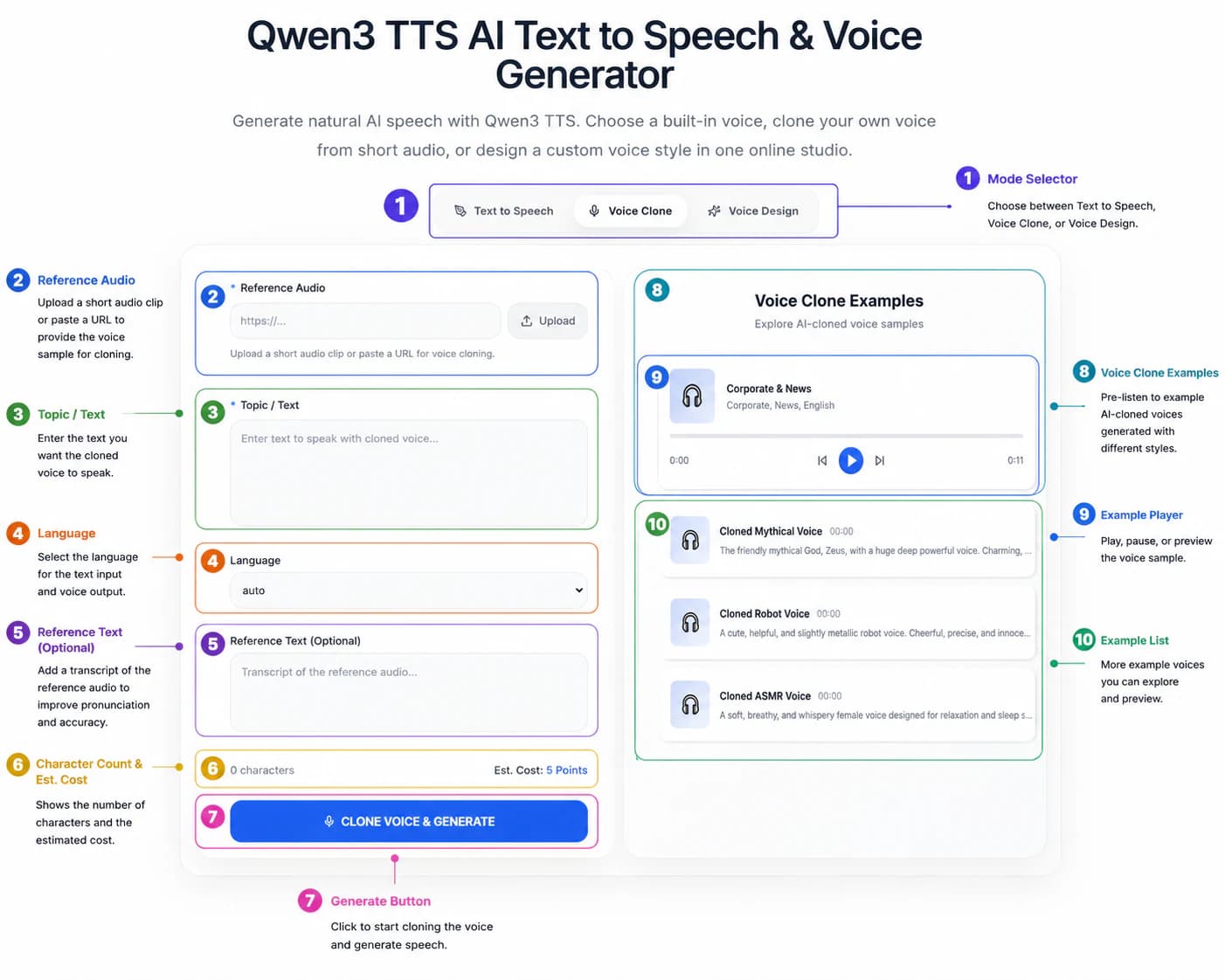
Select the Voice Cloning tab from the available generation modes.
The interface normally provides several options, including:
-
Text to Speech
-
Voice Cloning
Choose Voice Cloning whenever you want the system to generate new AI voices based on a reference recording rather than a predefined synthetic speaker.
Unlike standard text-to-speech, AI voice cloning uses uploaded audio to establish the vocal identity for future speech generation.
Step 2 — Upload a High-Quality Reference Audio Sample
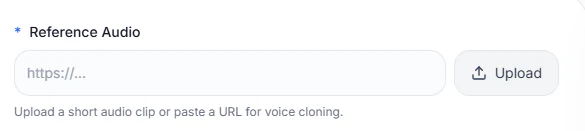
The reference recording is the foundation of every AI voice generation workflow.
You can typically provide the recording by:
-
uploading an audio file
-
pasting a supported audio URL
For the most natural AI voices, your recording should include:
-
one clearly audible speaker
-
minimal background noise
-
little echo
-
stable recording volume
-
natural pronunciation
Avoid recordings containing multiple speakers, music, overlapping dialogue, or excessive compression, as these can reduce AI voice cloning quality.
Only upload recordings that you own or have permission to use.
Step 3 — Enter the Script for AI Voice Generation
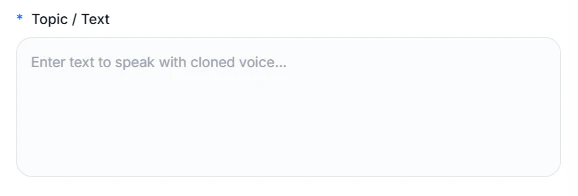
In the Topic/Text field, enter the script you want the cloned AI voice to speak.
The text does not need to match the original recording. Instead, the AI voice generator combines the supplied script with the learned voice characteristics to generate entirely new speech.
For more natural results:
-
write conversational sentences
-
use punctuation to guide pauses
-
keep paragraphs reasonably short
-
review spelling before generation
-
check names and technical terminology carefully
For longer narration projects, generating several shorter sections often produces better AI speech generation quality than processing one very large script.
Step 4 — Select the Correct Language
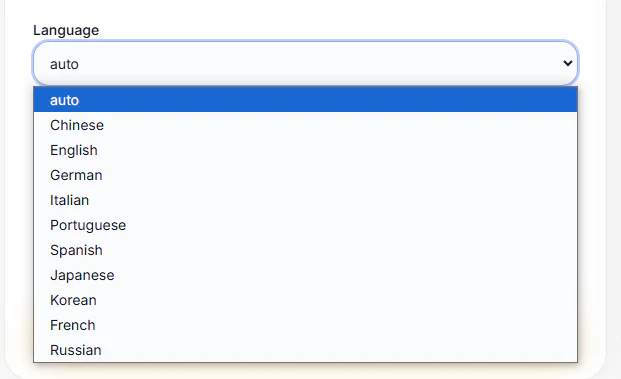
Choose the language that matches your target script.
Correct language selection helps the AI speech generation system interpret pronunciation, rhythm, and punctuation more accurately.
Before generating AI voices, verify that:
-
the script matches the selected language
-
names are spelled correctly
-
technical terminology has been reviewed
-
the reference recording is appropriate for the target language
When creating multilingual content, review each language separately rather than assuming identical pronunciation across languages.
Step 5 — Add the Reference Transcript
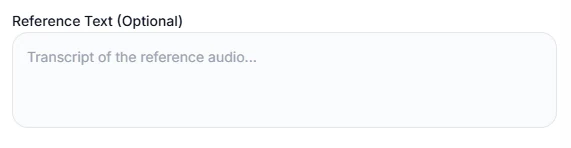
Some implementations allow you to provide a transcript of the reference recording.
If available, entering the spoken text can help the AI voice cloning system better align pronunciation with the supplied audio, particularly when the recording contains:
-
uncommon names
-
abbreviations
-
technical vocabulary
-
regional pronunciation
If you do not have an accurate transcript, it is generally better to leave this field empty than provide incorrect text.
Step 6 — Review Estimated Usage Before Generation

Before generating AI voices, review the estimated usage or credit cost displayed by the platform and check the current Qwen3 TTS pricing plans before a larger production run.
Checking these details helps avoid unnecessary processing when working with long scripts or multiple revisions.
Before submitting your request:
-
proofread the script
-
confirm the selected language
-
verify the uploaded audio
-
test a short sample first
Many creators find that generating a brief section before processing an entire project leads to more efficient AI voice generation.
Step 7 — Generate AI Voices

After confirming all settings, submit the request.
The AI voice generator analyzes:
-
the reference recording
-
the target script
-
language settings
-
optional transcript
It then generates new AI voices that aim to preserve the characteristics of the reference speaker while delivering entirely new speech.
Processing time depends on script length, platform implementation, and server demand.
Step 8 — Review the AI Voice Output
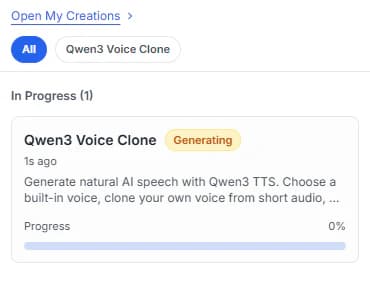
Always review generated speech before publishing.
Listen carefully for:
-
pronunciation accuracy
-
speaking pace
-
sentence rhythm
-
names and technical terms
-
vocal consistency
If improvements are needed, revise one element at a time instead of changing everything simultaneously.
An iterative review process generally produces better AI voice generation results than relying on the first output.
Generating a short test first is usually more efficient than submitting a long script immediately.
Using Voice Cloning Examples
The right side of the workspace contains a Voice Cloning Examples panel.
These samples demonstrate different types of AI-generated voices, such as:
-
company and news narration
-
narrative or character-style speech
-
robotic assistant voices
-
quiet ASMR-style voices
Use the play controls to listen to the available examples and understand how different speaking styles may sound.
These examples are primarily for inspiration. They do not replace the reference audio required for cloning your own permitted voice, and their results may not represent the exact output generated from your sample.
Best Recording Tips for Better AI Voice Generation
High-quality recordings remain one of the most important factors in successful AI voice cloning. Even advanced AI voice generators depend on clean reference audio to produce natural and consistent AI voices.
Following these best practices can significantly improve your AI speech generation results.
Record in a Quiet Environment
Background noise makes it more difficult for AI voice cloning systems to analyze vocal characteristics accurately.
Good recording environments include:
-
home offices
-
recording booths
-
quiet meeting rooms
Avoid:
-
traffic
-
televisions
-
fans
-
air conditioners
-
busy public spaces
Maintain a Consistent Distance
Keep a steady distance from the microphone throughout the recording.
Changing distance affects both tone and volume, reducing the consistency of AI voice generation.
Speak Naturally
Natural conversational speech usually produces better AI voices than exaggerated or overly dramatic delivery.
Imagine explaining something to another person rather than reading from a script.
Reduce Echo
Hard surfaces create reflections that reduce recording clarity.
Simple improvements include:
-
curtains
-
carpets
-
bookshelves
-
soft furniture
Reducing echo helps improve both AI voice quality and overall AI speech generation accuracy.
AI Voice Generation Prompt Examples
Some platforms allow prompts or speaking instructions to influence delivery style. While implementation varies, the following examples demonstrate common approaches that can help guide AI voice generation.
Professional Narration

Speak with a calm, confident, and professional tone while maintaining clear pronunciation and steady pacing.
Podcast Host

Use a friendly conversational style with natural enthusiasm and relaxed pacing.
Online Teacher

Explain each concept clearly, pause naturally after important points, and maintain an encouraging tone.
Marketing Video

Deliver the message with positive energy, confidence, and clear emphasis on key benefits.
AI Assistant

Speak politely, clearly, and naturally with a helpful and reassuring tone.
Audiobook

Read smoothly with expressive storytelling and consistent pacing throughout the chapter.
Game Character

Sound adventurous, energetic, and expressive while maintaining natural dialogue.
Customer Support

Use a calm, patient, and professional speaking style that is easy to understand.
Expert Tip
The quality of your script has just as much influence on AI voice generation as the quality of your recording.
Instead of writing for silent reading, write for spoken communication.
For example:
❌ Artificial intelligence possesses numerous applications regarding automated speech generation.
✅ AI voice technology can generate natural speech for many everyday applications.
Short, conversational sentences are generally easier for both listeners and AI speech generation systems to process.
Real-World AI Voice Cloning Use Cases
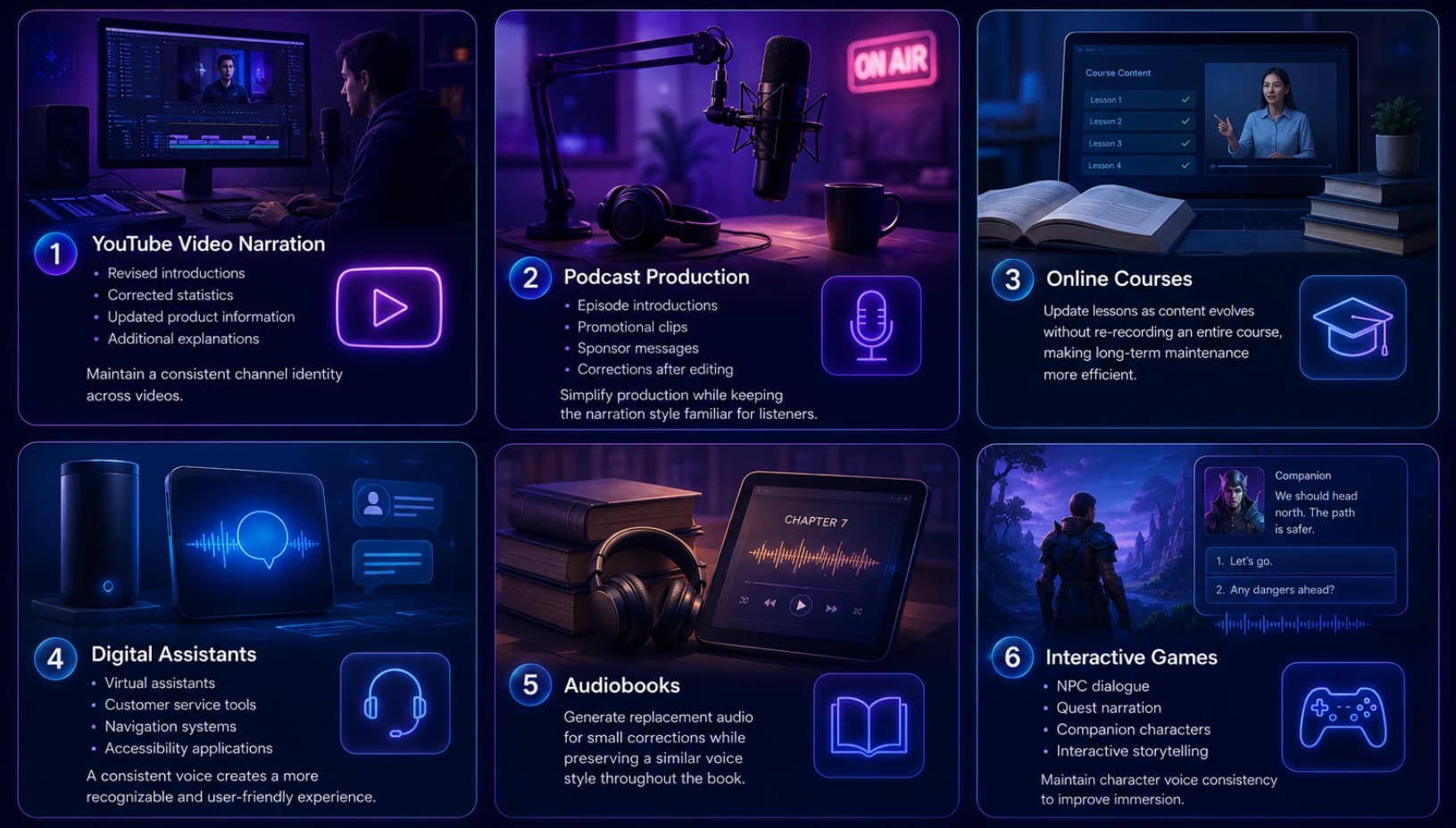
AI voice cloning has evolved from an experimental technology into a practical tool for creators, developers, educators, and businesses. By combining a reference recording with modern AI voice generation, users can produce consistent AI voices across a wide range of applications without repeatedly recording new narration.
Below are some of the most common real-world use cases for Qwen3 TTS AI Voice Cloning.
AI Voice Cloning for YouTube Videos
Many YouTube creators update existing videos after publication to correct information, add new details, or improve introductions.
Instead of recording an entirely new narration, AI voice cloning allows creators to generate replacement audio while maintaining a familiar AI voice across their channel.
Typical uses include:
-
updated introductions
-
revised statistics
-
product updates
-
additional explanations
-
translated versions
Using a consistent AI voice helps strengthen channel identity while reducing production time.
AI Voice Generation for Podcasts
Podcast production often requires:
-
episode introductions
-
promotional trailers
-
sponsor messages
-
post-production corrections
An AI voice generator can simplify these tasks by creating additional narration that matches the host's existing speaking style, making updates easier without requiring another recording session.
AI Voices for Online Education
Educational content frequently changes as software, regulations, and industry best practices evolve.
Instead of re-recording entire lessons, instructors can use AI voice generation to replace individual sections while preserving a consistent teaching voice throughout the course.
This approach is especially valuable for:
-
online courses
-
corporate learning
-
product training
-
internal documentation
-
certification programs
AI Speech Generation for Digital Assistants
Developers can integrate AI speech generation into conversational applications such as:
-
virtual assistants
-
customer support tools
-
navigation systems
-
accessibility software
-
AI-powered productivity apps
Maintaining a consistent AI voice helps improve user recognition and creates a more cohesive product experience.
AI Voice Cloning for Audiobooks
Audiobook production often requires corrections after recording.
Rather than scheduling another recording session, publishers and independent authors can use AI voice cloning to regenerate individual paragraphs or chapters while maintaining a consistent narrator voice.
This can significantly reduce production time for long-form content.
AI Voices for Interactive Games
Modern games increasingly rely on spoken dialogue.
AI voice generation can support:
-
NPC conversations
-
quest narration
-
tutorial dialogue
-
companion characters
-
interactive storytelling
A consistent AI voice helps improve immersion while simplifying dialogue updates during development.
Qwen3 TTS AI Voice Cloning vs ElevenLabs
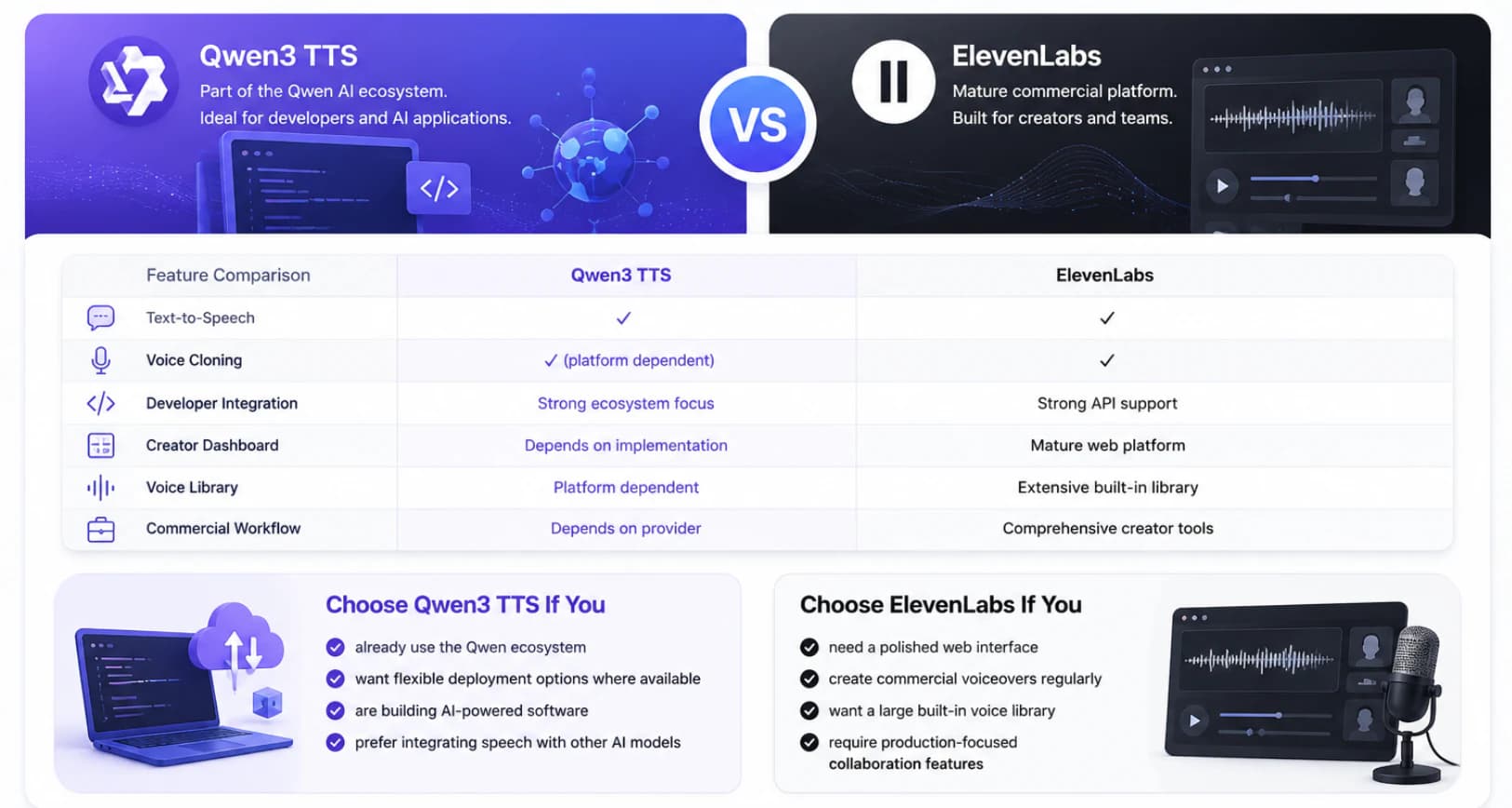
Both Qwen3 TTS AI Voice Cloning and ElevenLabs provide AI voice generation capabilities, but they target somewhat different audiences and workflows.
ElevenLabs is widely used as a commercial AI voice generator with a polished creator experience and an extensive built-in voice library. Qwen3 TTS AI Voice Cloning, meanwhile, is part of the broader Qwen AI ecosystem and may appeal more to developers and organizations building AI-powered applications that combine language models with speech generation.
Feature Comparison
Choose Qwen3 TTS AI Voice Cloning If You
-
already use the Qwen AI ecosystem
-
prefer flexible deployment options where available
-
are building AI-powered software
-
want to integrate speech generation with other AI models
-
need an AI voice generation workflow within a broader AI stack
Choose ElevenLabs If You
-
want a mature commercial AI voice generator
-
need a polished web interface
-
regularly produce commercial voiceovers
-
rely on a large built-in voice library
-
require collaboration tools for production teams
Ultimately, the right platform depends on your workflow, deployment requirements, and production goals rather than a single feature. Whenever possible, compare both platforms using the same reference recording and script before making a decision.
Common AI Voice Cloning Mistakes and How to Avoid Them
Even the most advanced AI voice generation systems rely on high-quality input. Understanding the following common mistakes can help you achieve more natural AI voices and more consistent AI speech generation results.
Mistake 1 — Using Low-Quality Audio for AI Voice Cloning
Reference audio is the foundation of every AI voice cloning workflow.
Recordings taken from social media, phone calls, livestreams, or public events often contain:
-
background noise
-
echo
-
heavy compression
-
overlapping voices
These issues make it more difficult for the AI voice generator to analyze vocal characteristics accurately.
Best Practice
Create a dedicated recording in a quiet environment whenever possible.
Mistake 2 — Expecting Perfect AI Voices on the First Attempt
Many users expect an AI voice generator to produce perfect speech immediately.
In practice, high-quality AI voice generation usually requires several iterations.
Small improvements to:
-
reference audio
-
punctuation
-
script structure
-
pronunciation
can noticeably improve the final result.
Best Practice
Generate a short sample first, review it carefully, then continue with the remaining script.
Mistake 3 — Ignoring Script Quality
Even excellent recordings cannot compensate for poorly written text.
Long sentences, inconsistent punctuation, and difficult wording often reduce AI speech quality.
Best Practice
Write conversational scripts that sound natural when spoken aloud rather than written for silent reading.
Mistake 4 — Cloning Voices Without Permission
AI voice cloning should only be used with recordings that you own or are authorized to use.
Depending on applicable laws and platform policies, unauthorized voice cloning may create legal or ethical issues.
Best Practice
Only upload recordings when you have permission from the speaker or own the rights to the audio.
Frequently Asked Questions
What is AI voice cloning?
AI voice cloning is an AI speech generation technique that analyzes a reference recording and generates new speech with similar vocal characteristics. Unlike traditional audio editing, it creates entirely new AI voices instead of copying existing recordings.
How does Qwen3 TTS AI Voice Cloning work?
Qwen3 TTS AI Voice Cloning analyzes vocal characteristics such as rhythm, pitch, pronunciation, and speaking style from a reference recording. It then combines this learned voice representation with new text to generate natural AI voices.
Is Qwen3 TTS an AI voice generator?
Yes. Depending on the platform or implementation you use, Qwen3 TTS can function as an AI voice generator by converting text into speech and supporting AI voice cloning workflows.
Can AI voice cloning preserve emotion?
Results vary by implementation and reference audio quality. A clear recording with natural expressive speech generally provides better emotional consistency during AI voice generation.
How much reference audio is recommended?
Requirements depend on the specific platform. In general, a clean recording with consistent speech quality is more important than simply providing a longer sample.
Why doesn't my AI voice sound natural?
Common causes include:
-
poor reference recordings
-
incorrect language selection
-
background noise
-
unnatural scripts
-
excessive room echo
Improving these factors usually produces better AI voice generation results.
Can AI voice cloning be used commercially?
Commercial use depends on the licensing terms and policies of the platform or service you choose. Always review the provider's documentation before publishing AI-generated voices.
Is AI voice cloning different from text-to-speech?
Yes. Traditional text-to-speech relies on predefined voices, while AI voice cloning generates new speech based on the characteristics of a reference speaker.
Can AI voice cloning support multiple languages?
Support varies depending on the implementation. Review the documentation of your chosen platform to understand available language options and expected behavior across multilingual workflows.
What affects AI voice generation quality the most?
The most important factors include high-quality reference recordings, natural pronunciation, clear scripts, correct language selection, and careful review of generated speech before publication.
Final Thoughts
Qwen3 TTS AI Voice Cloning demonstrates how modern AI voice generation can simplify professional speech production while maintaining consistent AI voices across a wide range of applications. Whether you are producing YouTube videos, podcasts, online courses, software tutorials, or AI-powered products, combining a high-quality reference recording with a well-structured workflow can significantly improve both efficiency and consistency.
Like other AI voice generators, the final quality depends not only on the underlying model but also on the quality of your reference audio, script writing, language selection, and review process. Rather than expecting perfect results from a single generation, treat AI voice cloning as an iterative workflow where small improvements often lead to noticeably better output.
As AI speech generation continues to evolve, understanding these best practices will help creators and developers build more reliable, scalable, and natural AI voice production pipelines.
Method note
How We Tested
This guide is based on official model documentation and the current qwen3tts.net implementation. It does not represent an independent benchmark unless explicitly stated.
Read the full methodologySources & evidence
Primary sources for this guide
- Qwen3-TTS official model repository
Official model documentation · QwenLM
- Qwen3-TTS CustomVoice model card
Official model page · Qwen
Try the workflow
Create Natural AI Voices with Qwen3 TTS AI Voice Cloning
Ready to explore Qwen3 TTS AI Voice Cloning?
Use this guide to build a practical AI voice generation workflow, improve AI voice quality, and learn how modern AI voice generators create natural speech from reference recordings. With the right recording techniques, clear scripts, and careful review, you can produce consistent AI voices for videos, education, software, podcasts, and many other real-world applications.
Open Qwen3 TTS Voice Clone